
Tutorial
Configure WiFi 6 on MikroTik AX Routers
Enable WiFi 6 (802.11ax) on MikroTik AX routers with RouterOS 7.13+ — step-by-step setup in Winbox covering band, channel, security, and tuning.
Summary WiFi 6 (802.11ax) on MikroTik AX routers — hAP ax2, hAP ax3, Chateau AX, and others — needs RouterOS 7.13 or newer and the new WiFi menu introduced in that release. This guide walks through the five-step Winbox setup for the WiFi interface, SSID, country, channel, and security, plus the tuning that makes WiFi 6 worth deploying: WPA3, OFDMA, MU-MIMO, and TWT power savings for client devices.
What is WiFi 6 on MikroTik and why upgrade?
WiFi 6 is the 802.11ax wireless standard. Unlike WiFi 5 (802.11ac), it isn’t just about top speed — it’s designed for efficiency in dense environments. Technologies like 1024-QAM, OFDMA, and MU-MIMO let an access point serve many devices simultaneously instead of sequencing them. Target Wake Time (TWT) lets client devices sleep longer between transmissions, materially extending phone and IoT battery life. WPA3 becomes mandatory, strengthening encryption against modern attacks. The combination of OFDMA and TWT reduces latency for real-time applications. The net effect: a MikroTik AX router handles more devices with less congestion and lower latency than the same-class WiFi 5 device.
Key benefits in production deployments:
- Higher data rates — 1024-QAM increases throughput, especially in multi-user scenarios.
- Better density performance — OFDMA and MU-MIMO split radio resources so the AP talks to many clients at once.
- Energy efficiency — TWT negotiates client wake intervals, extending battery life on phones and IoT devices.
- Stronger security — WPA3 by default, with improved protection against brute-force attacks.
- Lower latency — More efficient scheduling improves gaming, video conferencing, and other time-sensitive workloads.
For broader MikroTik device context, see our hAP ac² review (the WiFi 5 generation predecessor) and the hAP ac³ ISP CPE guide.
Prerequisites
Before configuration:
- MikroTik hardware with 802.11ax support — the hAP ax2, hAP ax3, Chateau AX, and similar AX models ship with the right radios. Confirm on the device’s specifications.
- RouterOS 7.13 or newer — the WiFi menu for Wave2/AX appeared in RouterOS 7.13. Update via Winbox or WebFig if needed.
- Administrative access via Winbox or WebFig with valid credentials.
- Basic networking knowledge — familiarity with IP addressing, DHCP, SSIDs, and WiFi security.
Step 1: Connect to the MikroTik
Open Winbox and log in using IP, username, and password. If the device has no IP yet, connect via MAC address for initial configuration.
Step 2: Open the WiFi menu
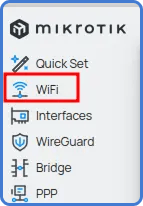
In the Winbox sidebar, click WiFi. This menu appears only on RouterOS 7.13 and later and is used to manage Wave2 and 802.11ax interfaces. If you don’t see it, check /system package update check-for-updates and upgrade.
Step 3: Select the wireless interface
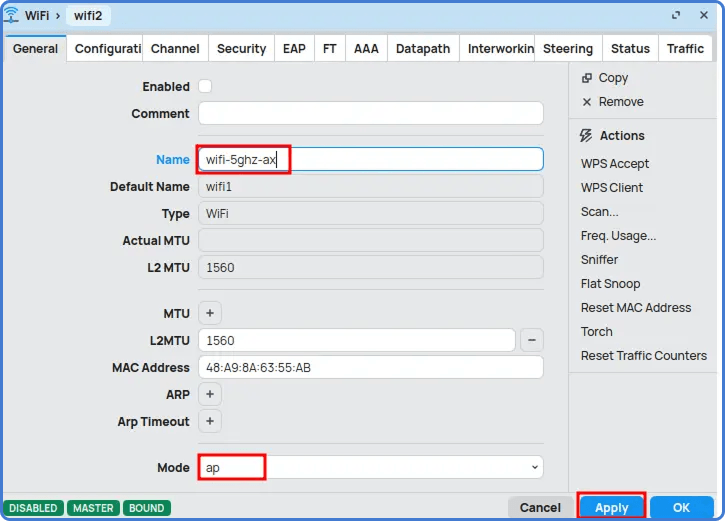
The WiFi window lists the available wireless interfaces (e.g., wifi2). Double-click the one you want to configure to open its properties.

Step 4: Configure the General tab
On the General tab:
- Name — give the interface an identifiable name (e.g.,
wifi-5ghz-ax). - Mode — select the operating mode. For access points, choose ap.
Click Apply.
Step 5: Configure SSID and Country
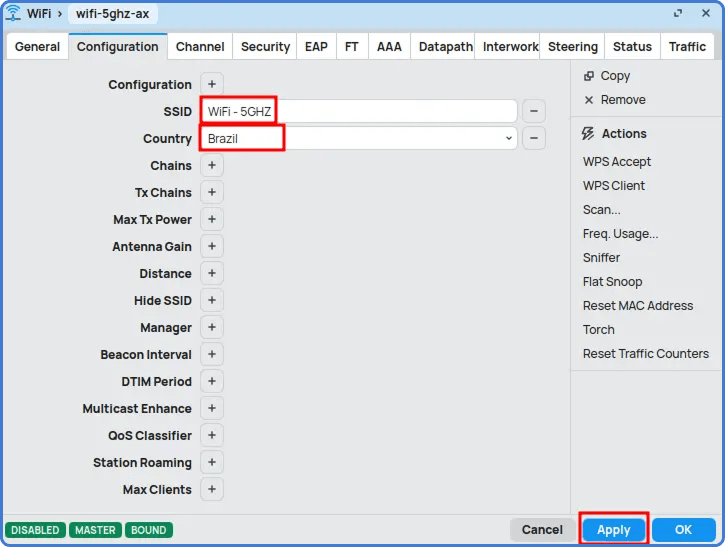
On the Configuration tab:
- SSID — the network name clients will see (e.g.,
MyWiFi-5GHz). - Country — select your country so the device applies regulatory channels, frequencies, and transmit-power limits.
Click Apply.
Step 6: Configure Channel
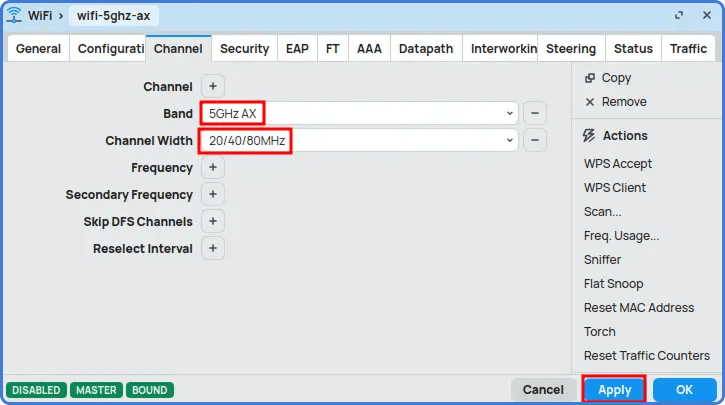
On the Channel tab:
- Band — pick 5 GHz AX for 5 GHz radios, or 2.4 GHz AX for 2.4 GHz.
- Channel width — to maximize WiFi 6 performance on 5 GHz, select 20/40/80 MHz; on 2.4 GHz, use 20/40 MHz.
Wider channels give more throughput only in clean spectrum. In crowded urban environments, dropping to a narrower channel often improves real-world performance by avoiding contention.
Click Apply.
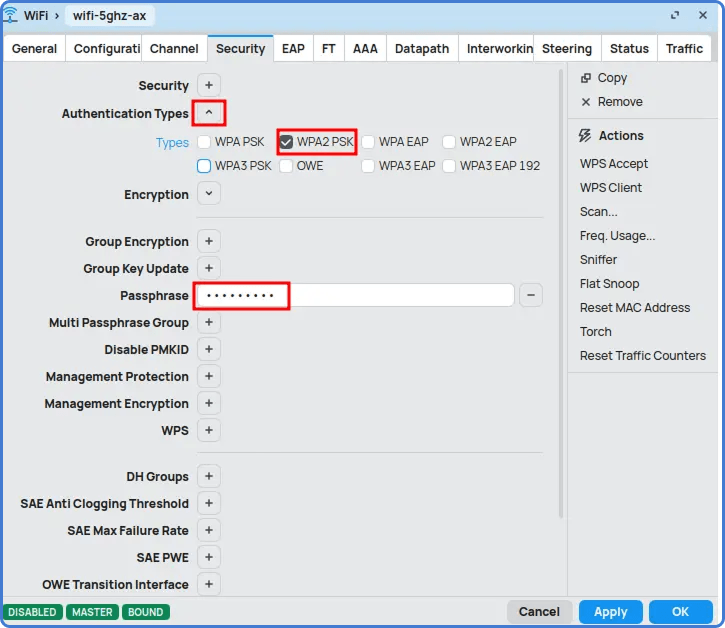
Step 7: Configure Security
On the Security tab:
- Authentication — use WPA3-PSK if router and clients both support it. Fall back to WPA2-PSK for older client compatibility.
- Passphrase — strong, mixed-case, with numbers and special characters. Avoid common words.
Click OK to finish.
Tips
- Place the router in an open area, not inside a cabinet — 5 GHz attenuates quickly through walls and furniture.
- Scan the spectrum before forcing channel width. The widest band only helps when the spectrum is genuinely clean.
- Pair WiFi 6 with DNS over HTTPS and the AdList ad-blocking guide for a fully hardened LAN.
Take the next step
Upgrading to WiFi 6 on MikroTik AX routers is a sensible move for any network that needs more speed, capacity, and security. With OFDMA, MU-MIMO, TWT, and WPA3, WiFi 6 improves throughput and reduces latency and energy consumption. Once the steps above are complete and country and channel settings are appropriate, the router broadcasts a high-performance WiFi 6 network ready for current and next-generation client devices.
Across a fleet of WiFi 6 routers, MKController standardizes configuration templates and surfaces drift between sites before it becomes a customer complaint — particularly useful when AX hardware rolls out gradually alongside older AC devices.