
Tutorial
MikroTik WireGuard Client VPN Setup
Configure a MikroTik router as a WireGuard client with policy-based routing and a kill switch in five short steps on RouterOS v7.
Summary WireGuard runs natively on MikroTik routers from RouterOS v7 onward and is the fastest, simplest way to send specific LAN devices through a VPN tunnel. This guide configures the MikroTik as a WireGuard client, adds policy-based routing so only the devices you choose use the tunnel, and installs a blackhole route as a kill switch that drops traffic if the tunnel goes down instead of leaking it through the ISP.
How does WireGuard work on MikroTik?
WireGuard is a modern VPN protocol that ships natively with RouterOS v7 — no add-on package, no container, no kernel module to compile. On a MikroTik router, you configure a WireGuard interface, assign it a tunnel IP from your VPN provider, add a peer (the remote server) with its public key and endpoint, and then decide which local traffic actually traverses the tunnel using policy-based routing.
The result is a fast, audited cryptographic tunnel that performs significantly better than OpenVPN or L2TP/IPsec on the same hardware. The protocol was designed to be a few thousand lines of code instead of tens of thousands, which is why it both runs faster and is easier for security researchers to verify.
Get your WireGuard credentials
Before opening Winbox, gather the configuration from your VPN provider (Proton VPN, Mullvad, NordVPN, or a self-hosted WireGuard server). You need four pieces of information:
- Private Key: assigned to your MikroTik interface. The provider’s portal typically gives you a config file containing this.
- Public Key: belongs to the remote server. The MikroTik uses it to authenticate the peer.
- Endpoint address and port: the IP or hostname of the server and the UDP port it listens on (commonly
51820). - Allowed IPs: usually
0.0.0.0/0for a full tunnel that handles all traffic. Narrow this if you only want specific subnets to traverse the tunnel.
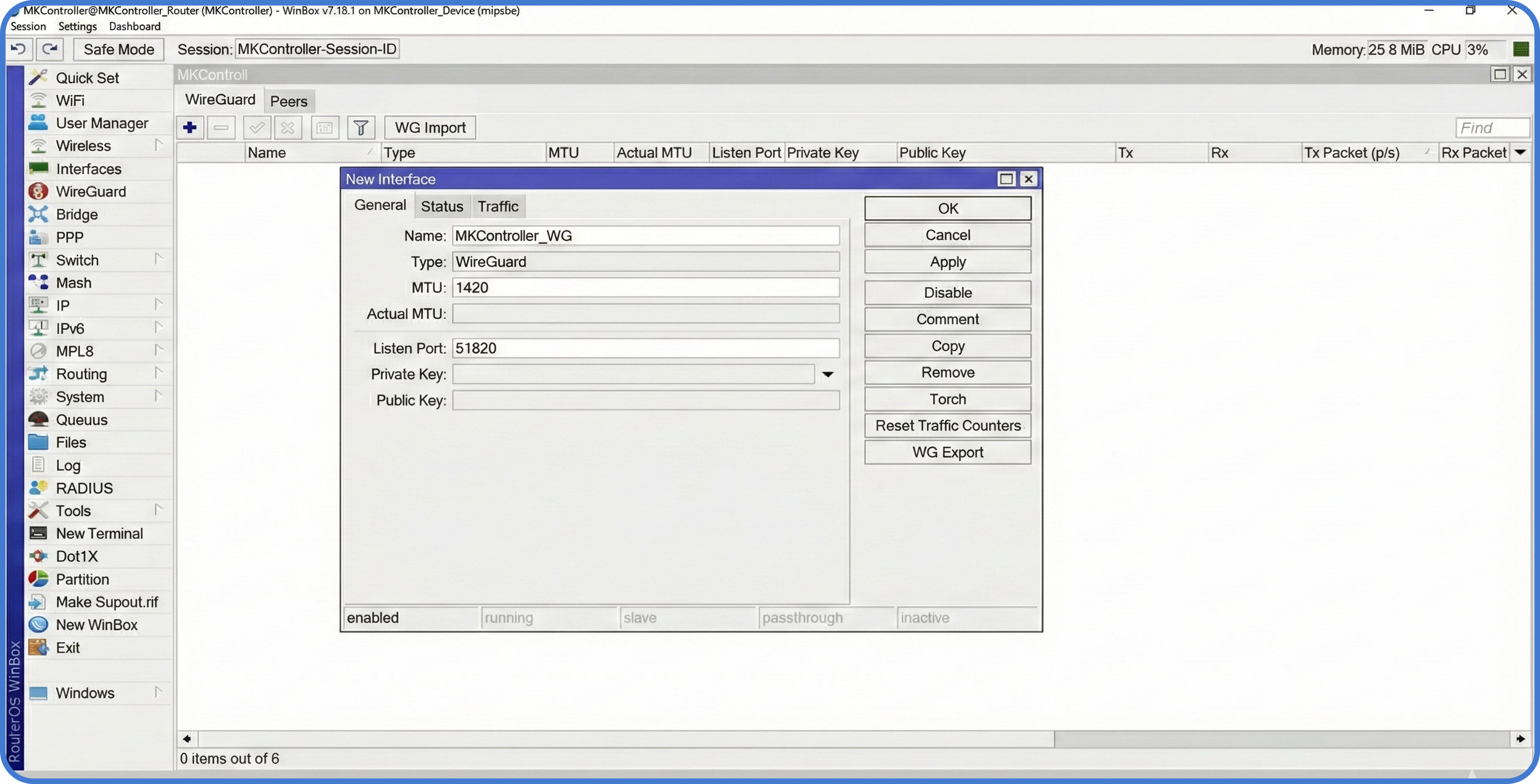
Step 1: Create the WireGuard interface
In Winbox, navigate to the WireGuard menu and click + to add a new interface. Name it WG-Client, paste the Private Key the provider gave you, and click OK — the MikroTik will derive the matching public key automatically. Under IP → Addresses, add the IP the provider assigned to your tunnel (something like 10.66.66.2/32).
Step 2: Configure the peer
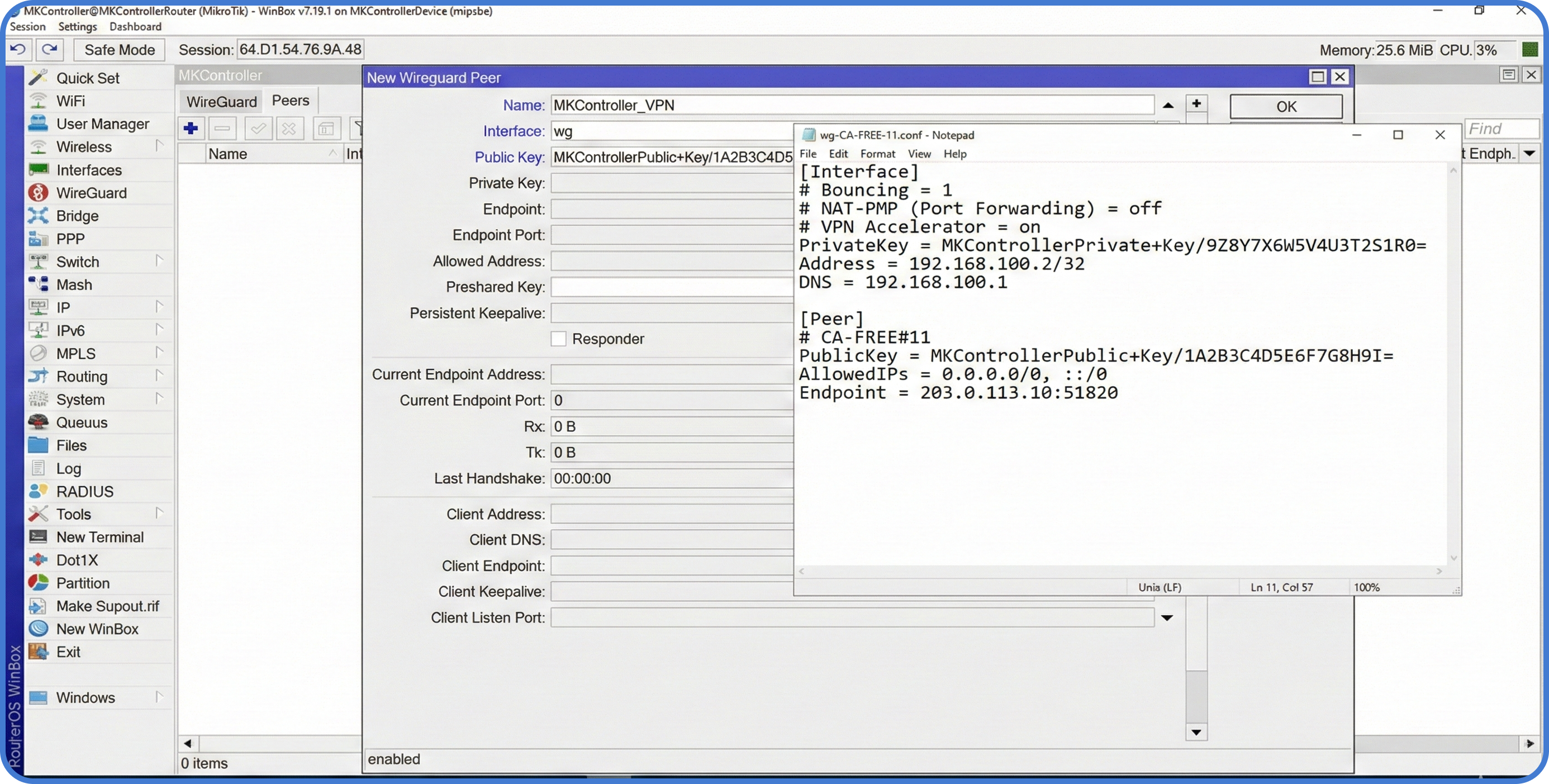
The peer is the remote server you’re connecting to. In the WireGuard window, switch to the Peers tab and add a peer pointing at the WG-Client interface:
- Public Key: the server’s public key.
- Endpoint and Endpoint Port: the server’s IP and UDP port.
- Allowed IPs:
0.0.0.0/0. This permits all traffic to pass through the tunnel — but it does not yet route anything. Routing happens in Step 4.
Step 3: Policy-based routing (PBR)
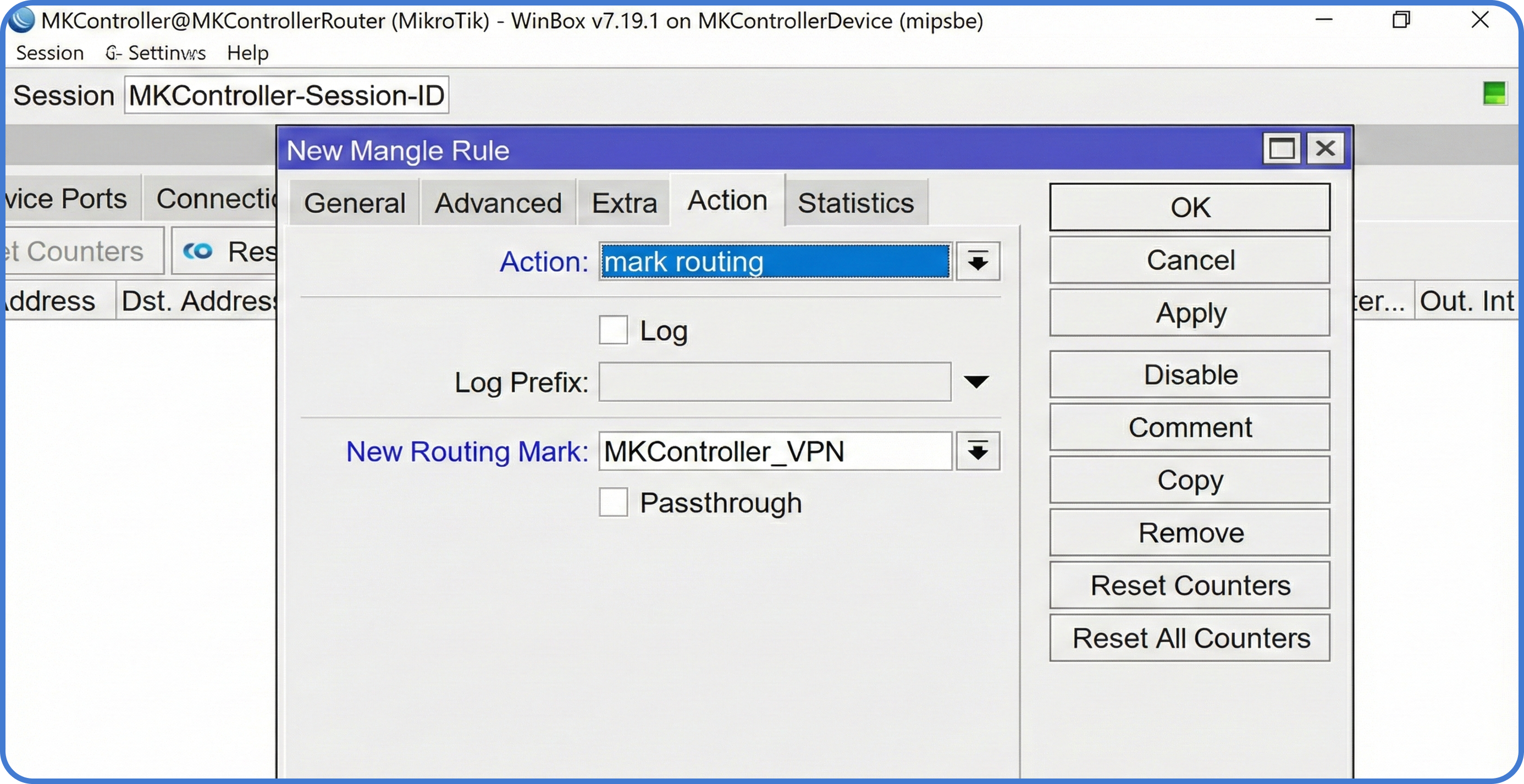
You usually don’t want the entire LAN on the VPN — only specific devices, like a workstation that needs to reach a geo-restricted service or a media server that handles privacy-sensitive traffic. MikroTik solves this with Mangle rules that mark packets, and routing tables that act on the marks.
- Go to
IP → Firewall → Mangle. - Add a new rule with
Chain: prerouting. - Set Src. Address to the local IP of the device you want tunneled (e.g.,
192.168.88.50). - Set Action to
mark routing. - Set New Routing Mark to
via-wireguard. - Uncheck “Pass Through” — without this, downstream rules can override the mark and you’ll lose the tunnel.
Step 4: Routing and the kill switch
Now tell the router that any packet marked via-wireguard must go through the tunnel.
- Go to
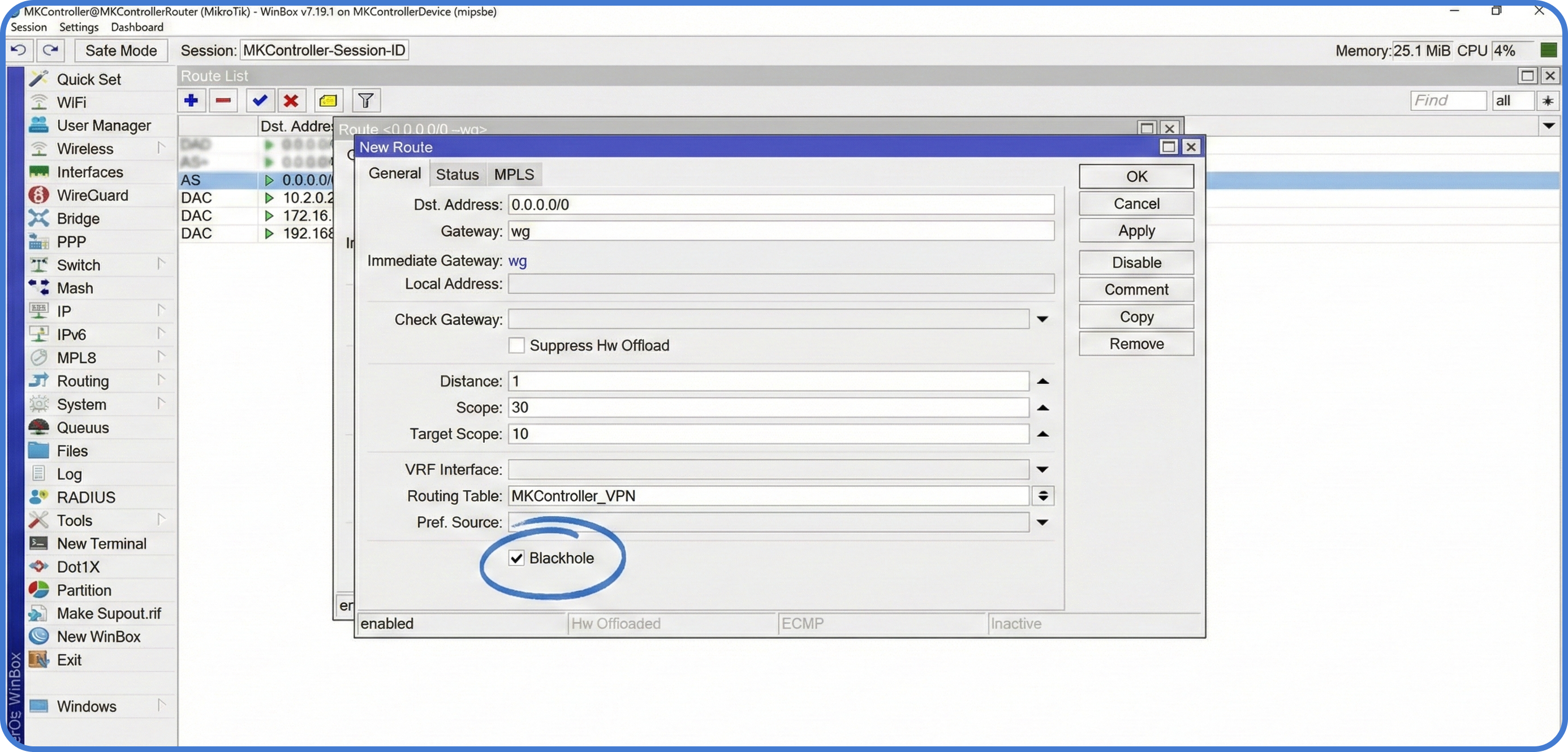
IP → Routes. - Add a new route:
Gateway: WG-Client,Routing Table: via-wireguard,Distance: 1. - Add the kill switch — add a second route with the same
Routing Table(via-wireguard), set Type toblackhole, and give it a higherDistance(e.g.,10).
The blackhole route is the critical piece. If the WireGuard tunnel drops, the normal route disappears, the blackhole route takes over, and packets matched by the Mangle rule are silently dropped instead of falling back to the ISP — no DNS leaks, no IP leaks, no unencrypted traffic out the WAN.
Verify the tunnel
From the device you marked for tunneling, browse to a site like ifconfig.me or whatismyip.com. It should report the VPN server’s IP, not your ISP’s. Then, on the MikroTik, run:
/interface/wireguard/peers print statsA working peer shows recent rx and tx byte counters that increase as you generate traffic. If the byte counters stay at zero, the most common cause is a missing or wrong endpoint port, or a firewall on the WAN dropping outbound UDP.
Tips
- Keep the kill-switch distance higher than the working route’s distance — if you accidentally invert them, the blackhole becomes primary and all tunneled traffic drops, even when the tunnel is up.
- If you’re managing multiple MikroTik devices remotely through the same tunnel, see our SSTP remote management guide for a complementary protocol, or WireGuard for remote MikroTik management for the full remote-admin pattern.
- WireGuard does not retry handshakes aggressively when the endpoint is unreachable; if your VPN provider rotates servers, plan to rotate the endpoint configuration too.
Take the next step
WireGuard on one MikroTik takes twenty minutes. Maintaining the same configuration — same keys rotated on schedule, same kill-switch rule, same Mangle marks — across a fleet of sites is where operational discipline matters. Drift creeps in: an engineer changes a Mangle rule for one customer, a router gets reset and the kill switch is missing, a key rotation skips one device.
MKController pushes the same WireGuard, Mangle, and routing configuration to every MikroTik in your inventory and surfaces the devices that diverge from the template. When a tunnel drops or a kill switch is missing on a customer site, the dashboard flags it before the customer notices.