
Sell Cash Wi-Fi with Point of Sale (Resellers)
This content is not available in your language yet.
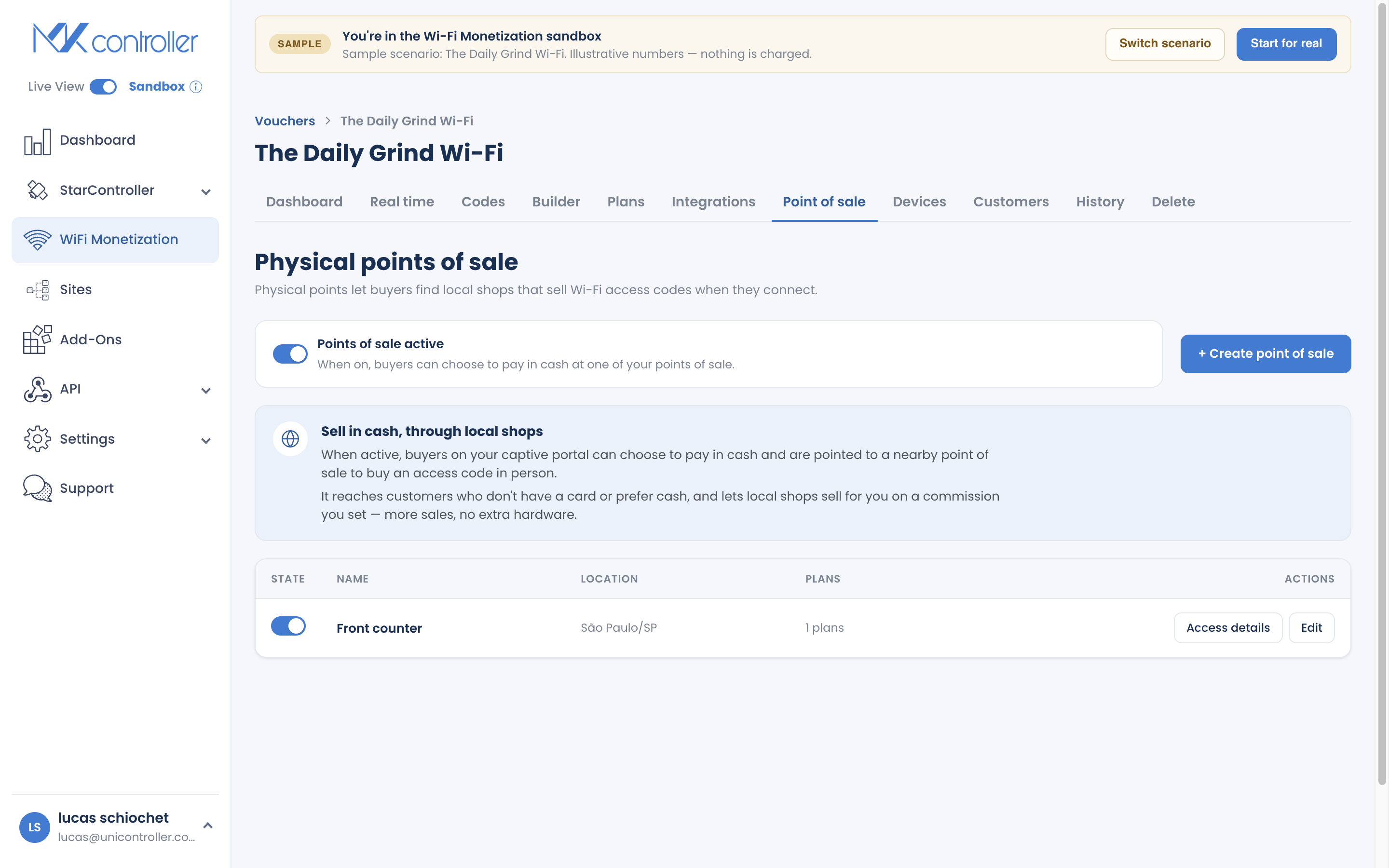
Summary Point of Sale (POS) lets local resellers sell your Wi-Fi for cash. Each reseller gets a simple web portal — no app, no hardware — where they mint codes and take payment in person. You choose which plans they sell and set a commission, and every sale is tracked. It is the way to reach guests who pay cash in places you cannot staff yourself.
What Is Point of Sale?
Section titled “What Is Point of Sale?”Point of Sale turns a trusted person — a shopkeeper, a front desk, a kiosk owner — into a reseller of your Wi-Fi. They open a web portal, generate a code, and hand it to a customer who pays them cash. You extend your reach; they earn a commission.
When to Use Point of Sale
Section titled “When to Use Point of Sale”Reach for POS when:
- Your guests pay cash and cards or Pix are uncommon.
- You want to sell in locations you cannot staff — a nearby shop, a building lobby, a market stall.
- You want local sellers to grow your coverage on commission.
It pairs naturally with printed codes and complements online plans.
How to Set Up a Reseller
Section titled “How to Set Up a Reseller”Step 1: Turn on Point of Sale
Section titled “Step 1: Turn on Point of Sale”In your voucher, open the POS section and switch the feature on. A short explainer describes how resellers and commissions work.
Step 2: Add a reseller
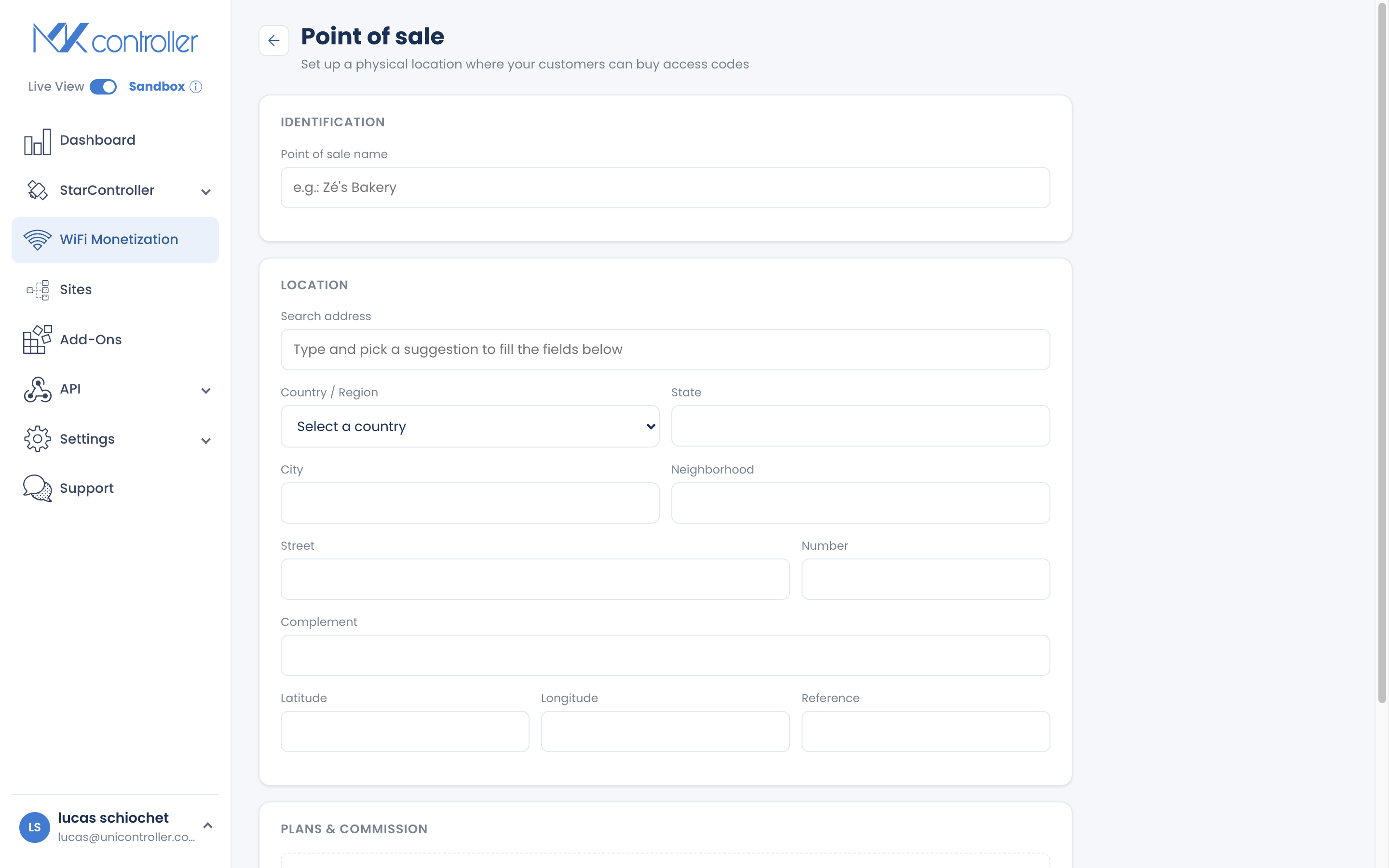
Section titled “Step 2: Add a reseller”Create a reseller with:
- Name and location (searchable).
- The plans they are allowed to sell.
- A commission percentage for their sales.
Step 3: Share the portal credentials
Section titled “Step 3: Share the portal credentials”Each reseller gets a portal link and passwords. The sales login lets them sell; an admin login gives them a little more. Share these securely — the link plus password is how they sign in.
How Commission Works
Section titled “How Commission Works”You set a commission percentage per reseller, and the app tracks it against their sales so you can see what each reseller has earned.
Tips for Growing with Resellers
Section titled “Tips for Growing with Resellers”- Start with one trusted reseller near your hotspot, prove the model, then add more.
- Give them a tight plan list. A couple of easy-to-sell passes beat a long menu at a busy counter.
- Use location names you recognize so your reports tell you which spots convert.
- Review sales on the Dashboard to see which resellers and locations are working, and lean into those.
Frequently Asked Questions
Section titled “Frequently Asked Questions”Do resellers need an app or hardware? No. They use a web portal in any browser. There is no terminal to buy.
How do resellers get paid? You set and track a commission, but payment to the reseller is arranged by you. Commission is currently informational, not auto-settled.
Can I limit what a reseller sells? Yes. Choose exactly which plans each reseller can offer.
Can a reseller see their commission rate? No. The commission is hidden from the reseller’s sales login.
How do I track reseller performance? The Dashboard breaks down sales so you can compare resellers and locations.
Explore next: Create & Print Voucher Codes · Create & Sell Online Plans · Dashboard, Realtime & Reports · Get Paid — Payout & Financeiro
Ready to add a reseller? Start your free MKController account or talk to our team on WhatsApp.