
Crea i ven plans de Wi-Fi en línia
Resum Un pla és un paquet vendible d’accés a Wi-Fi —una durada, una quantitat de dades i una velocitat a un preu fix— que els visitants compren directament al teu portal captiu mitjançant Pix, targeta o WhatsApp. Els plans són la manera de vendre accés sense estar-hi present. Pots pausar, reprendre i eliminar plans i editar el preu; per canviar altres detalls, crea un pla nou.
Què és un pla?
Section titled “Què és un pla?”Un pla és una oferta que els visitants veuen al teu portal captiu: “R$5 compren 1 hora a 5 Mbps”, “R$15 compren 30 dies”. Quan un visitant tria un pla i paga, WiFi Monetization (Monetització del Wi-Fi) genera l’accés automàticament i el connecta: sense cap codi per lliurar, sense cap acció per part teva.
Els plans són la contrapart en línia dels codis impresos. Els codis són per a vendes presencials en efectiu; els plans són per a l’autoservei i els ingressos recurrents. La majoria dels operadors utilitzen tots dos.
Abans de crear un pla
Section titled “Abans de crear un pla”Un pla només es pot comprar si hi ha un mètode de pagament habilitat, perquè els visitants tinguin una manera de pagar. Configura Pix, una passarel·la de targeta o de diners mòbils, o la venda per WhatsApp primer, o just després. Si habilites Pix però no tens plans, l’aplicació et recorda que encara no hi ha res per vendre.
Com crear un pla
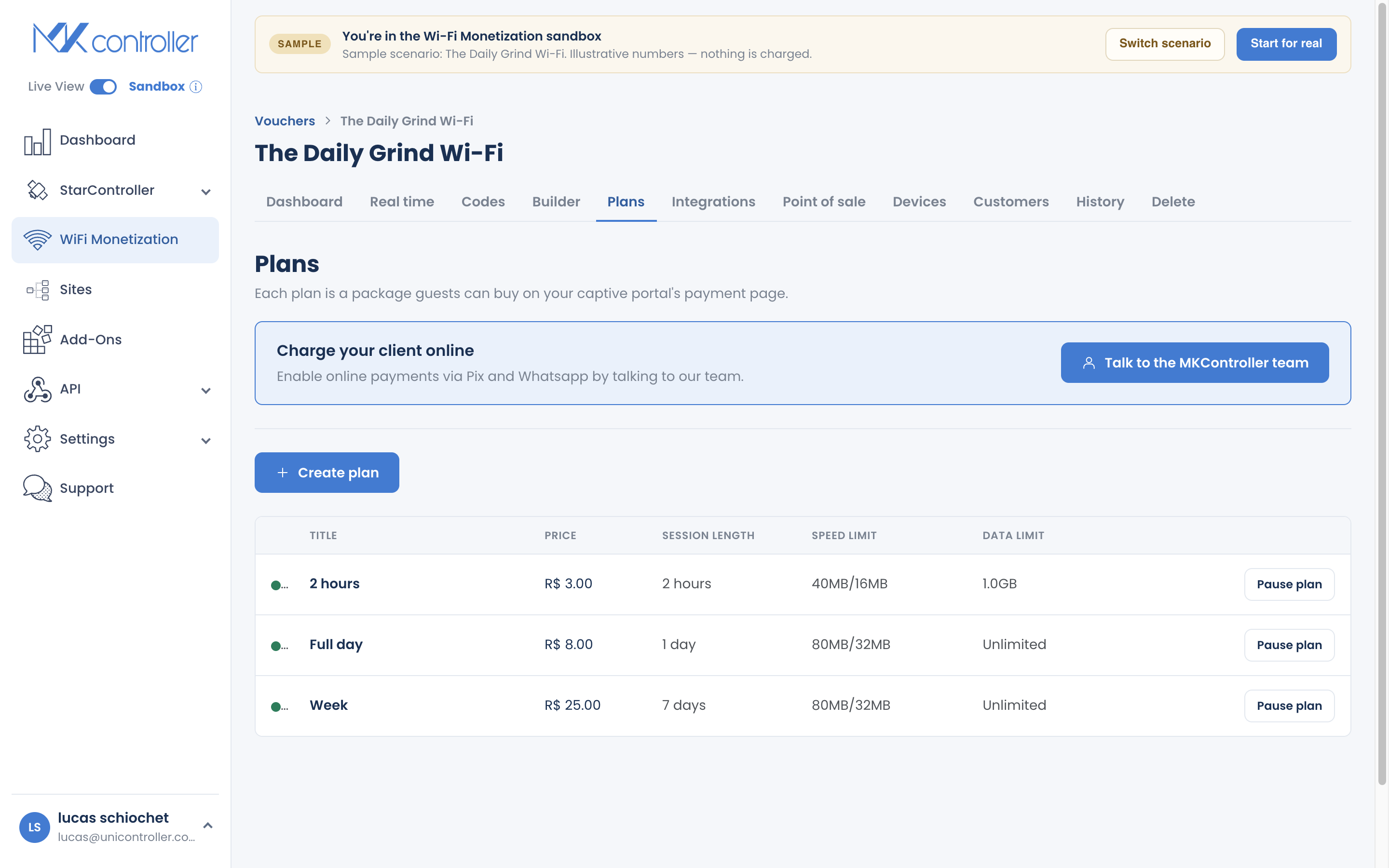
Section titled “Com crear un pla”Pas 1: Obre Plans
Section titled “Pas 1: Obre Plans”Obre el teu voucher i ves a la secció Plans. Comença un pla nou.
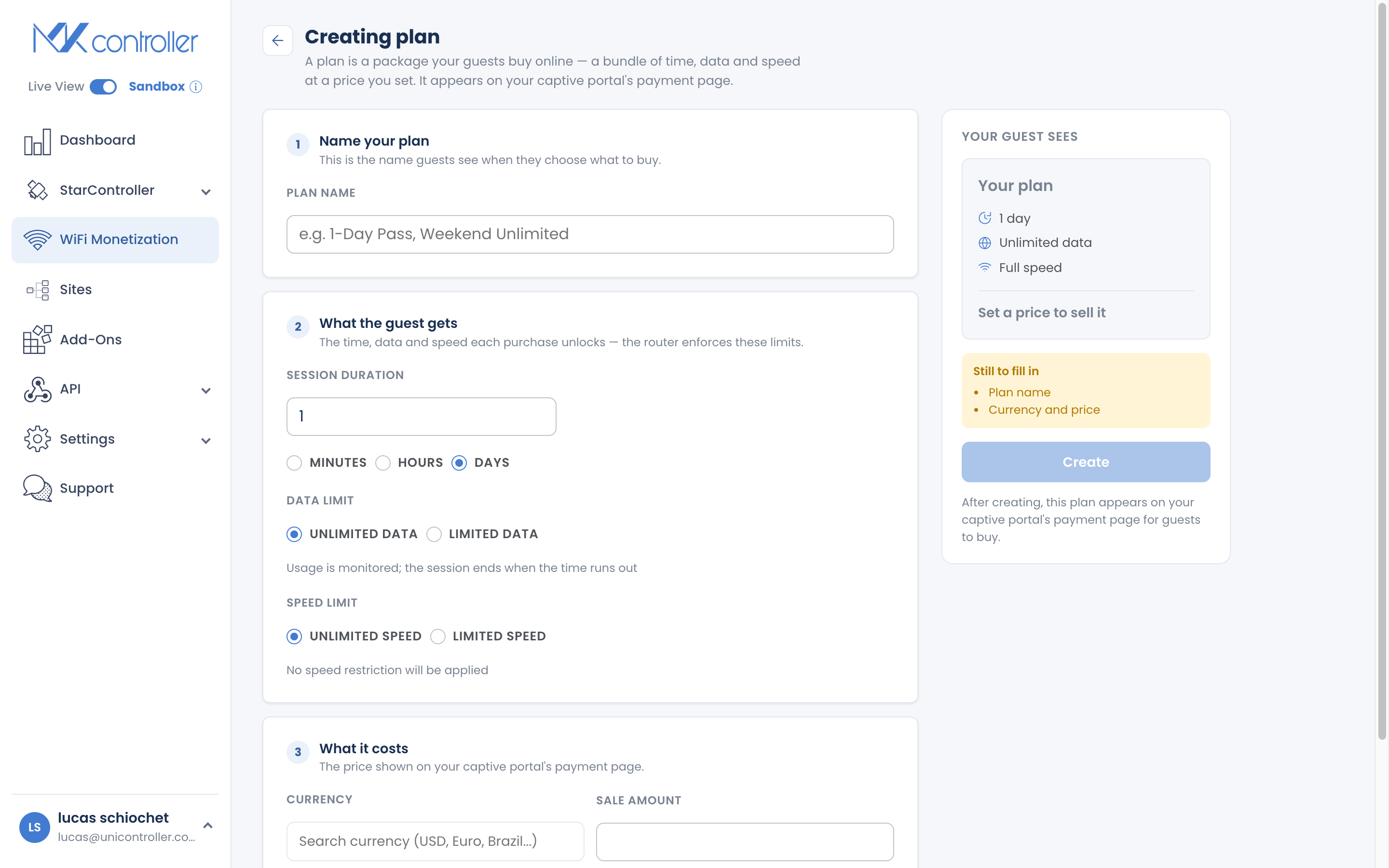
Pas 2: Defineix què rep el visitant
Section titled “Pas 2: Defineix què rep el visitant”- Durada — quant dura el pla, en minuts, hores o dies.
- Dades — il·limitades, o un límit en MB/GB.
- Velocitat — il·limitada, o un límit per a l’ús equitatiu i els enllaços per satèl·lit.
Consulta Defineix límits de dades i velocitat per obtenir orientació sobre els límits.
Pas 3: Defineix el preu
Section titled “Pas 3: Defineix el preu”Defineix el preu i la moneda. La pantalla de creació del pla mostra una targeta d’oferta tal com la veu el visitant mentre escrius, de manera que veus l’oferta com la veurà un comprador: el valor (“1 hora a 5 Mbps”) just al costat del preu. Això facilita comprovar que l’oferta es llegeix amb claredat.
Pas 4: Publica
Section titled “Pas 4: Publica”Crea el pla. Apareix al teu portal captiu, ordenat al costat dels teus altres plans del més barat al més car, llest perquè els visitants el comprin.
Gestió de plans
Section titled “Gestió de plans”Des de la secció Plans pots:
- Pausar un pla per deixar de vendre’l temporalment, i reprendre’l més tard.
- Eliminar un pla que ja no ofereixis.
- Editar el preu d’un pla existent.
Com dissenyar la teva gamma de plans
Section titled “Com dissenyar la teva gamma de plans”Configurar un pla és fàcil; decidir quins plans oferir és on els operadors s’encallen. Fes servir la guia següent com a punt de partida i deixa que el Dashboard et mostri què es ven realment.
Quants plans hauria d’oferir?
Section titled “Quants plans hauria d’oferir?”Dos o tres. Més opcions semblen generoses, però normalment venen menys: quan un visitant s’enfronta a una llista llarga, s’atura a deliberar i sovint se’n va sense comprar. Comença amb un pas curt i un pas més llarg, i afegeix un tercer només quan la demanda sigui clara. Una escala petita i clara converteix millor que un mur d’opcions, i és fàcil de canviar més endavant.
Quina durada s’ajusta al meu local?
Section titled “Quina durada s’ajusta al meu local?”La durada ha de coincidir amb quant de temps roman realment un visitant. Punts de partida habituals:
| Local | Durades típiques | Per què |
|---|---|---|
| Cafè / bar / restaurant | 30 min – 2 h | Coincideix amb una visita; els passos curts fan rotar les taules i generen vendes recurrents |
| Hotel / coworking | 1 dia / diversos dies | Els hostes s’hi queden una sessió o diversos dies |
| Condomini / edifici | 30 dies (mensual) | Accés recurrent per a residents i els seus visitants |
| Esdeveniment / fira | Durada de l’esdeveniment o pas d’1 dia | Una sola compra cobreix tota la visita |
| Comunitat rural / Starlink | 1 dia / 1 setmana | Recàrregues assequibles i freqüents per a un enllaç compartit |
Hauria de limitar la velocitat, i fins a quant?
Section titled “Hauria de limitar la velocitat, i fins a quant?”Un límit de velocitat protegeix l’experiència de tothom quan molts visitants comparteixen un sol enllaç. Limita la velocitat quan la teva connexió sigui compartida o la capacitat sigui ajustada (satèl·lit, LTE, un cafè concorregut); pots deixar-la il·limitada en un enllaç de fibra ràpid i poc carregat.
Què cal considerar: l’amplada de banda total del teu enllaç de pujada, quants visitants es connecten alhora i què vols habilitar —navegació i xarxes socials, o vídeo i descàrregues—. Guia aproximada per visitant:
| Experiència del visitant | Velocitat per pla |
|---|---|
| Navegació, missatgeria, xarxes socials | 2 – 5 Mbps |
| Vídeo HD còmode | 5 – 10 Mbps |
| Usuaris premium / avançats | 10 Mbps+ o il·limitat |
Un nivell més ràpid a un preu més alt també és una venda addicional honesta: ven un pla “Bàsic” i un “Turbo” i deixa que els visitants triïn.
Hauria de limitar les dades, i fins a quant?
Section titled “Hauria de limitar les dades, i fins a quant?”Limita les dades quan el teu backhaul sigui mesurat o costós (satèl·lit, LTE) perquè uns quants usuaris intensius no consumeixin tota la teva franquícia. En un enllaç de fibra il·limitat, normalment pots deixar les dades sense límit. Guia aproximada:
| Pla | Límit de dades |
|---|---|
| Pas curt (hores) | 500 MB – 1 GB |
| Pas de dia | 1 – 3 GB |
| Setmana / mes | 5 – 15 GB, o il·limitat en fibra |
També pots vendre plans només de dades (un volum sense límit de temps): un encaix natural per a les comunitats per satèl·lit que paguen per gigabyte.
Els mecanismes per aplicar els límits són a Defineix límits de dades i velocitat.
Posa-hi preu perquè el valor sigui evident
Section titled “Posa-hi preu perquè el valor sigui evident”- Ancora el valor al costat del preu. Anomena els plans en termes senzills (“1 hora”, “1 dia”, “30 dies”) perquè el visitant capti a l’instant què compra amb aquest preu.
- Sigues honest. Durades reals, velocitats reals, sense condicions ocultes: la confiança és el que converteix una primera venda en una de recurrent.
Segueix millorant
Section titled “Segueix millorant”- Llança en petit i després ajusta. Comença amb dos plans, observa quin es ven al Dashboard i ajusta preus o durades a partir de la demanda real.
- Combina canals. Combina els plans en línia amb codis impresos per a qui prefereix pagar en efectiu al taulell.
- Amplia el teu abast. Afegeix un revenedor Point of Sale per vendre en llocs on no pots tenir personal.
- Prova abans de llançar. Fes servir el simulador “prova com a visitant” del Builder per comprar el teu propi pla i confirmar que l’oferta es llegeix amb claredat.
Preguntes freqüents
Section titled “Preguntes freqüents”Com paguen els visitants un pla? Al portal captiu, mitjançant Pix, amb targeta o diners mòbils a través de la teva passarel·la, o acordant el pagament per WhatsApp. Consulta Rep pagaments amb Pix.
Puc editar un pla després de crear-lo? Pots editar el preu i pausar, reprendre o eliminar el pla. Per canviar la durada, les dades o la velocitat, crea un pla nou.
En quin ordre apareixen els plans als visitants? Els plans es llisten del més barat al més car al portal captiu.
Quina diferència hi ha entre un pla i un codi? Un pla es compra en línia i genera l’accés automàticament; un codi és una credencial impresa que lliures per a vendes presencials.
Necessito un mètode de pagament per vendre plans? Sí. Habilita almenys un mètode de pagament perquè els visitants puguin pagar.
Explora a continuació: Rep pagaments amb Pix · Defineix límits de dades i velocitat · Rep els teus pagaments — Payout i Financeiro · Dashboard, temps real i informes
Preparat per vendre el teu primer pla? Crea el teu compte gratuït de MKController o parla amb el nostre equip per WhatsApp.