
UniFi Controller Security — SSL & Backups
Summary MKController provides enterprise-grade security for UniFi Controller access through three layers: encrypted remote access via VPN tunnel with MFA and dynamic IP whitelisting, automated user credential provisioning with scoped permissions through the UniFi API, and end-to-end SSL encryption with automatic certificate renewal. User deactivation in MKController triggers instant, complete credential revocation in the UniFi environment — a capability not natively available in Ubiquiti’s own UniFi Cloud Controller.
What Does MKController Security for UniFi Mean?
Section titled “What Does MKController Security for UniFi Mean?”MKController security for UniFi is the access governance layer that controls how users authenticate to, connect to, and operate your UniFi Controller through the MKController cloud platform. It covers authentication (VPN + MFA), authorization (scoped user provisioning), and data protection (end-to-end SSL) — without requiring you to manage certificates, firewall rules, or user databases manually.
How Does Remote Access Security Work?
Section titled “How Does Remote Access Security Work?”MKController routes all remote access to your UniFi Controller through an advanced VPN tunnel. Access requires both a valid MKController account and MFA verification, with dynamic IP whitelisting applied at the session level. No unverified session can reach your UniFi backend.
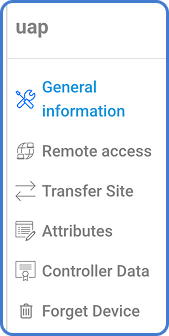
This model eliminates the most common attack surface for UniFi deployments: direct internet exposure of the UniFi web interface. The controller is reachable exclusively through MKController’s encrypted infrastructure.
How Does User Credential Provisioning Work?
Section titled “How Does User Credential Provisioning Work?”When you add a user in MKController, their credentials are provisioned directly into the UniFi Controller via API — with predefined, scoped permissions tied to specific sites, AP groups, or operational roles. This process is fully automated, eliminating manual entry, credential spreadsheets, or SSH commands.
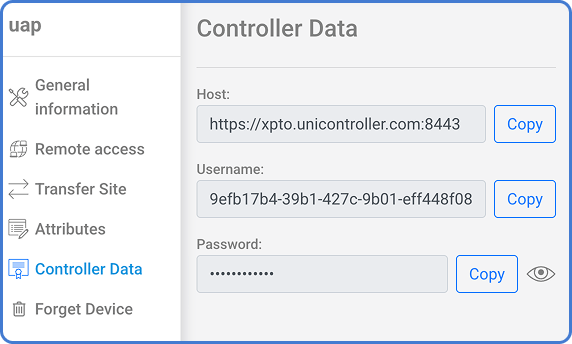
The provisioning workflow is repeatable and scalable across multi-site deployments. This level of API-driven credential automation is not natively available in Ubiquiti’s own UniFi Cloud Controller, which requires manual user management per controller.
What Happens When a User Is Deactivated?
Section titled “What Happens When a User Is Deactivated?”When a user is deactivated or removed in MKController — due to role change, contract end, or security incident — their credentials are revoked instantly and completely from the UniFi environment. There are no residual permissions, no ghost sessions, and no lingering access tokens. The revocation is real-time, surgical, and fully logged.
How Does MKController Compare to UniFi Cloud for Security?
Section titled “How Does MKController Compare to UniFi Cloud for Security?”| Capability | UniFi Cloud (native) | MKController |
|---|---|---|
| Remote access authentication | Username/password | VPN tunnel + MFA + dynamic IP whitelisting |
| User credential provisioning | Manual per controller | Automated via API with scoped permissions |
| Credential revocation | Manual | Instant and complete on user deactivation |
| Multi-site user scoping | Limited | Scoped to site, AP group, or role |
| SSL certificate management | Manual or self-signed | Automatic renewal, HTTPS enforced everywhere |
How Is Data Encrypted?
Section titled “How Is Data Encrypted?”All sessions and data streams in the MKController environment are protected by industry-standard SSL certificates with automatic renewal. HTTPS is enforced across all interfaces, ensuring encrypted management traffic from your browser to the UniFi backend. Self-signed certificates are not used — every connection is authenticated with a valid, automatically renewed certificate.

Why Automated Credential Revocation Matters
Section titled “Why Automated Credential Revocation Matters”In a traditional UniFi setup, when a technician leaves the team or a contract ends, the administrator must manually log into each UniFi controller and remove that user’s account. In multi-site deployments with dozens of controllers, this is error-prone and often overlooked — leaving ex-employees or former partners with active credentials indefinitely.
MKController’s instant revocation solves this at the infrastructure level: deactivating a user in one place removes access from all associated UniFi controllers simultaneously, with a complete audit log of the revocation event.
Frequently Asked Questions
Section titled “Frequently Asked Questions”Does MKController require me to manage SSL certificates manually? No. All SSL certificates used by MKController’s UniFi controller are automatically provisioned and renewed. HTTPS is enforced on all connections — there are no manual renewal steps, no expiry warnings, and no risk of connections falling back to unencrypted HTTP.
Is MFA (multi-factor authentication) mandatory for UniFi access? MFA is enforced at the MKController account level. Since all UniFi controller access is routed through MKController’s authenticated VPN tunnel, MFA applies to every UniFi management session — regardless of whether the UniFi controller itself has MFA configured.
What happens to UniFi device configurations if I lose access to MKController? Adopted UniFi devices retain their existing configuration and continue operating normally. They remain managed by the controller but MKController-specific governance features (alerts, audit logs, centralized user management) become unavailable until access is restored.
Can I audit who accessed specific UniFi devices and when? Yes. MKController logs all access events with user attribution and timestamps. See Action History for more on how audit logs work across the platform.
Questions about UniFi security configuration or user provisioning? Contact MKController support on WhatsApp.
Questions? 📧 contato@mkcontroller.com