
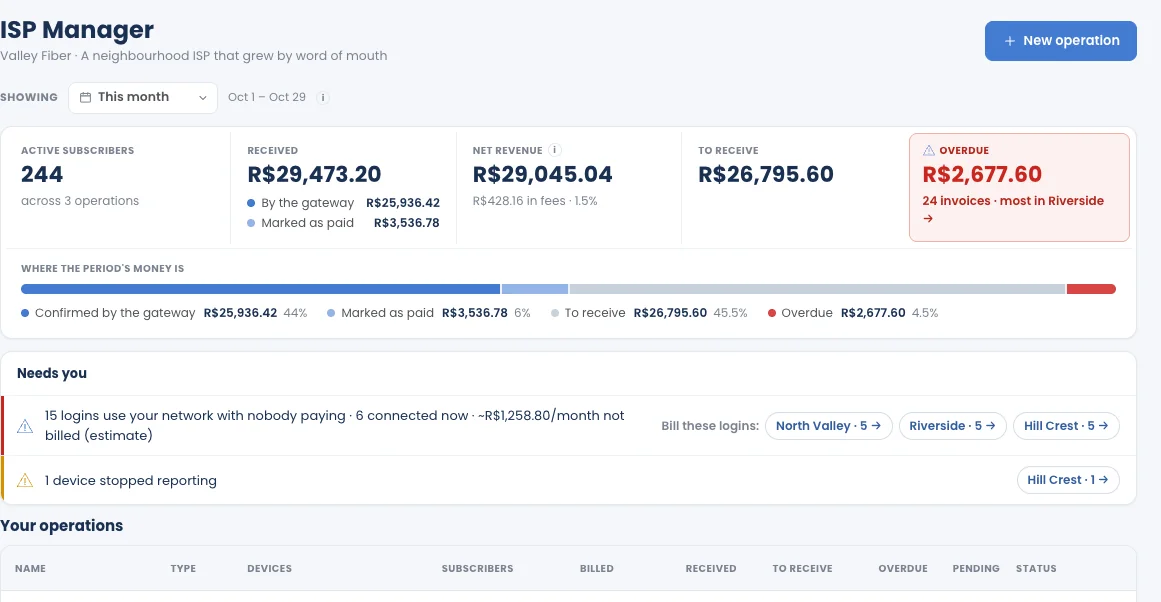
Month end on autopilot.
Month end shouldn’t mean a spreadsheet and a day of messages.
A small ISP grows by word of mouth. Billing grows by hand — until collecting takes more time than running the network.
Logins nobody pays for. A PPPoE login enabled on the router, with no customer behind it on your list — using your network every day, billed to no one.
A day of messages. Reminders and overdue notices typed one customer at a time, from a spreadsheet that’s never quite up to date.
Blocking and restoring by hand. Someone has to log in to the router to cut a late payer — and log in again, sometimes at night, when they pay.
Money you can’t see. The gateway, the bank and the cash box each tell part of the story. Nobody knows what’s still to receive this month.
Your router already knows your customers. Now it bills them.
Built into MKController, where your MikroTik routers are already adopted — no second system, nothing to install.
Starts from your MikroTik
Reads the PPPoE logins and profiles already on your routers and turns them into plans and subscribers. Nothing changes on the router.
Collections that run themselves
Reminder, Overdue notice, Reduce speed and Block, each on its day — counted in days or hours, and each one can be switched off.
Paid, back online in seconds
Automatic restore gives service back within seconds of payment and tells the subscriber. No one has to be awake for it.
Your money, your gateway
Each invoice carries a payment link from your own gateway account. Cash and payments you receive yourself are marked by hand.
ISP Manager in about a minute.
Video in English, with captions. Step-by-step videos in the ISP Manager playlist, or watch the one-minute Short.
From the router’s logins to money in the bank.
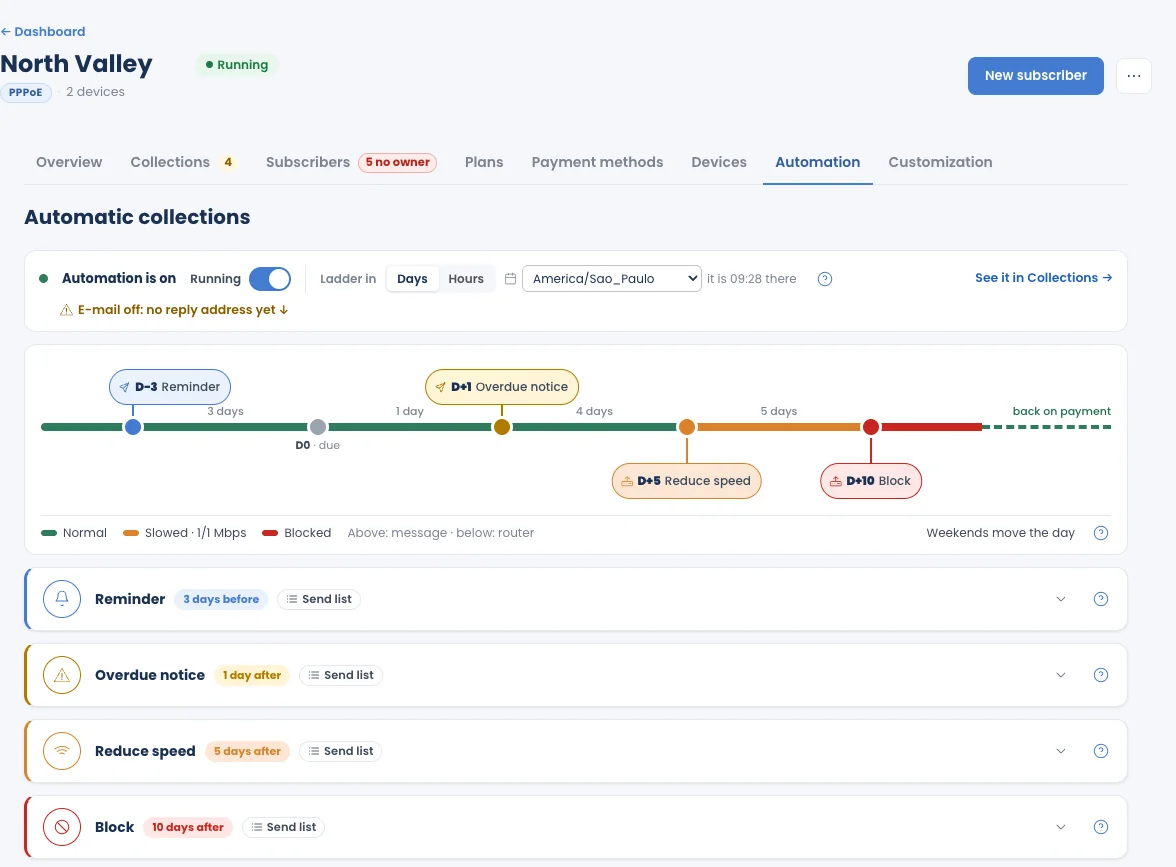
Set the collection steps once. They run every month.
Choose when each step happens, in days or hours. Messages go above the line, router actions below it. A step that falls on a weekend moves to a weekday, always away from the due date. Reduce speed uses a reduced-speed profile you choose. See Collection steps.
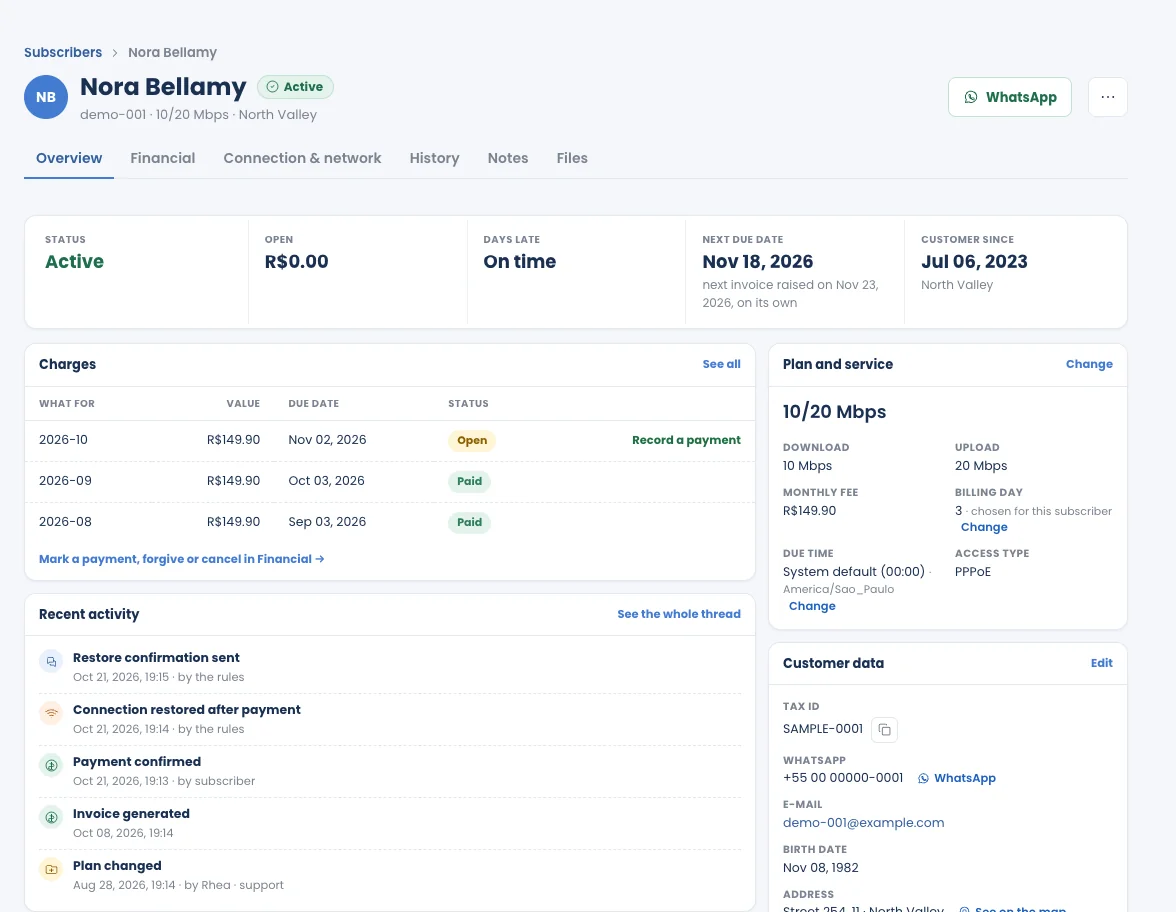
Every subscriber’s story on one page.
Charges, plan and speed in Mbps, connection and history — including the moment a payment came in and the connection came back. Record a payment, accept a promise to pay, or change the plan from the same page. See Subscribers.
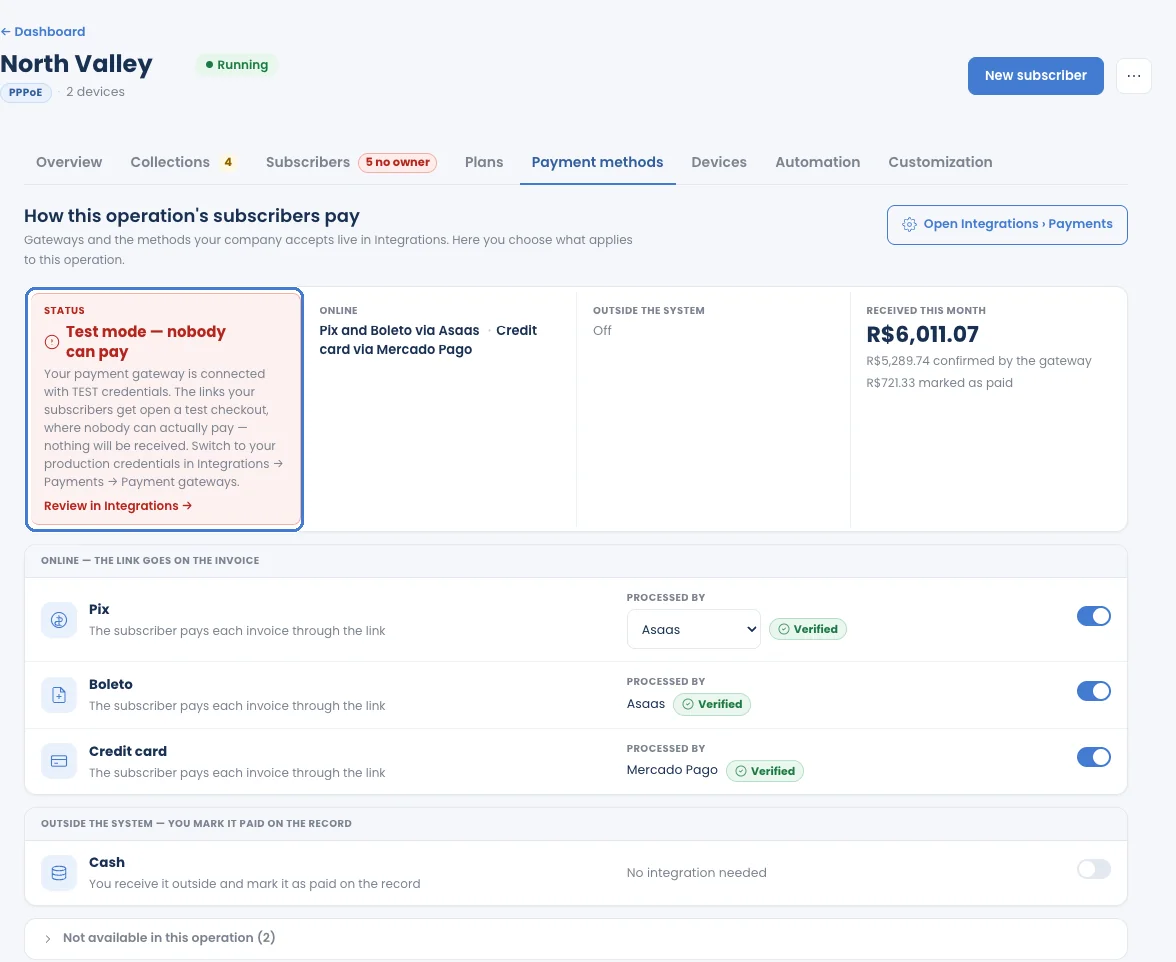
Get paid through your own gateway.
Connect a gateway once in Integrations › Payments — such as Asaas or Mercado Pago — and the link goes on every invoice. Pix and boleto for companies in Brazil, card where your gateway supports it, cash by hand. A clear warning tells you when a gateway is still in test mode. See Payment methods.
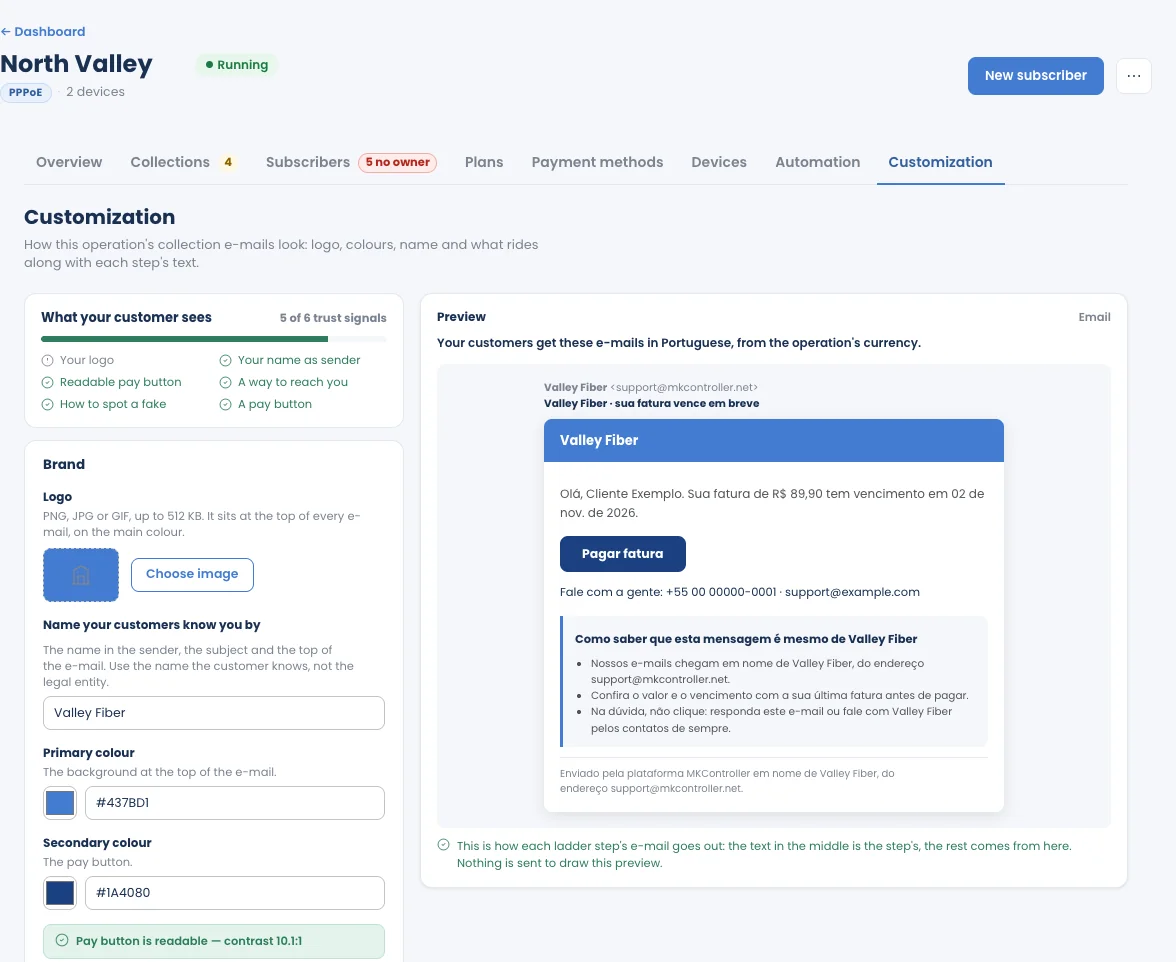
Billing e-mails your customers recognise.
Your logo, colours and name on every billing e-mail, sent from your own Gmail or SendGrid address so replies land in your inbox. Subscribers read them in their language: Portuguese for BRL, Spanish for Spanish-speaking currencies, English for the rest. See Billing e-mails.
Why not keep the spreadsheet and WhatsApp?
They work for twenty customers. Past that, every month end costs a day — and the late payers you forgot cost more.
| Need | Spreadsheet + WhatsApp | ISP Manager |
|---|---|---|
| Who has paid | Checked by hand against the bank and the gateway | Confirmed by your gateway, or marked by hand |
| Reminders and overdue notices | Typed one by one | E-mail goes out on its own; WhatsApp and SMS ready to open or copy |
| Reduce speed and block | Someone logs in to the router | Runs on the router on its day |
| Restore after payment | Whenever someone notices | Within seconds, and the subscriber is told |
| Logins nobody pays for | Invisible | Flagged on the dashboard, with an estimate per month |
| Plans | Typed from memory | Read from your PPPoE profiles |
WhatsApp and SMS messages are sent from your own account: ISP Manager prepares the list and the text each day.
What works today — and what’s next.
If it isn’t shipped yet, we say so. No fine print.
- Dashboard across every operation: received, to receive and overdue, what needs you today, and logins using your network with nobody paying
- One operation per city or POP, each with its own routers, plans, currency, time zone and collection steps
- 8-step setup; a new operation stays a draft until you activate it — no approval needed
- Plans read from your PPPoE profiles: import from routers, split by profile, duplicate a plan
- Subscribers: add one, change plan, move POP or due day for several at once, and give an owner to logins nobody pays for
- Subscriber page: overview, financial, connection & network, history, notes and files
- Monthly invoices; record a payment, mark as paid, or accept a promise to pay
- Five collection steps — Reminder, Overdue notice, Reduce speed, Block, Automatic restore — in days or hours, weekends handled, each one switchable
- Collections tab: today’s messages ready to open in WhatsApp or copy, a Board view, and charges the gateway refused
- Payments through your own gateway (such as Asaas or Mercado Pago): Pix and boleto in Brazil, card, cash by hand, and a test-mode warning
- Billing e-mails with your logo, colours and name, from your own Gmail or SendGrid address, in the subscriber’s language
- Devices tab: which routers report and accept commands, and stopped commands you can retry
- Deactivate an operation at any time; delete it at once if it was never used, or through a request to our Support team if it has data
- If your plan changes, operations pause — nothing is deleted — and resume on Advanced
IPoE subscribers
Today ISP Manager reads PPPoE logins. Next: bases run on IPoE, where subscribers are identified by IP and shaped by a queue instead of a login.
ISP Manager in the MKController Android app
Today ISP Manager runs in the web app. Next: subscribers and collections in the MKController Android app, for the day-to-day away from a desk.
WhatsApp and SMS sent for you
Today e-mail goes out on its own, and WhatsApp and SMS messages are prepared for you to send from your own account. Next: sending them through your connected channels, on the same schedule.
Holidays in the collection calendar
Today a step that falls on a weekend moves to a weekday. Next: your local holidays, so no reminder or block lands on a day off.
Set it up today. Nothing runs until you say so.
The setup reads what your router already has. Your operation waits as a draft — no invoice, no message, no router command — until you click Activate this operation.
Eight short steps
Devices, plans, customers, how you get paid, how you send messages and your collection steps — then review.
A draft until you activate
Check every plan and price first. Nothing is billed and no step runs on the router before you activate.
Switch off any time
Deactivate an operation and billing stops; your subscribers, plans and history stay. See Create an operation.
Take month end off your plate.
Start your free trial, connect the MikroTik that serves your subscribers, and let ISP Manager run the collections.
Start your free trial →Part of MKController Advanced · included in the free trial · PPPoE on MikroTik · read the guide · or talk to our team