
The Collections Tab: Today's Messages and the Board
The Collections tab is the day’s desk: the messages you send by hand today, who moves to the next step soon, and the charges a gateway refused. Open an operation and click Collections. The number next to the tab is how many messages are waiting.
▶ Today’s Collections list in ISP Manager · WhatsApp, Board and payments — video in English, with captions.
To do: today’s messages
Section titled “To do: today’s messages”E-mail goes out on its own. WhatsApp and SMS do not: for each one you copy the message, send it from your own account, and mark it here.
At the top:
| Card | What it counts |
|---|---|
| To send today | People to message today, and how much is at stake. |
| Move on within 3 days | People who reach their next step soon. |
| Late | The overdue amount and how many people owe it. See the board opens the Board. |
| Done today | Messages already handled today. |
Below, the list groups people by urgency (for example Before the ladder moves on, For today, No way to tell them). Filter by step (Reminder, Overdue notice) or by No WhatsApp, or search by name.
Send a message
Section titled “Send a message”- Click a person in the list. The panel on the right shows the message, their contact, the bill and What happens next.
- Click WhatsApp (or Open in WhatsApp) to open the conversation with the message, or Copy if they have no WhatsApp.
- Send it from your own account, then mark it as sent.
Click Board to see every overdue subscriber grouped by the step they have reached.
Charges the gateway refused
Section titled “Charges the gateway refused”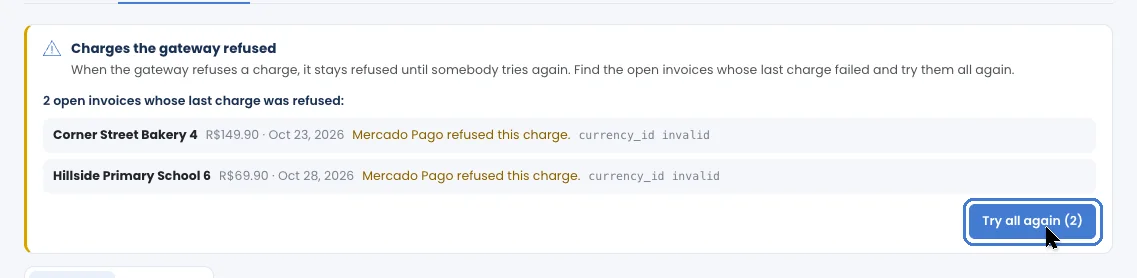
When a payment gateway refuses a charge, it stays refused until someone tries again. The banner Charges the gateway refused finds the open invoices whose last charge failed; click Look, check the list, and try them all again. Each invoice shows why it failed and which gateway refused it on the subscriber’s Financial tab.
Paid or promised?
Section titled “Paid or promised?”- Paid in cash or outside the system: on the subscriber’s page, click Record a payment. Service comes back the same way as a payment through the link. See Record a payment.
- Promised to pay on a date: record the Promise to pay with the date they gave you. See Promise to pay.