
Deactivate, Reactivate or Delete an ISP Manager Operation
Deactivate stops an operation’s billing and can be undone; Delete removes an operation for good and needs it deactivated first. Both are in the operation’s ⋯ menu, at the top right of the operation.

| Action | What happens | Can it be undone? |
|---|---|---|
| Deactivate operation | Billing stops and the operation goes back to draft. | Yes: reactivate it any time. |
| Delete operation, never used | Deleted right away. | No. |
| Delete operation, with data | A deletion request goes to our Support team. | Yes, while the request is pending: cancel it. |
Deactivate an operation
Section titled “Deactivate an operation”- Open the operation and click ⋯ › Deactivate operation.
- Check what stops and what stays, then click Deactivate.
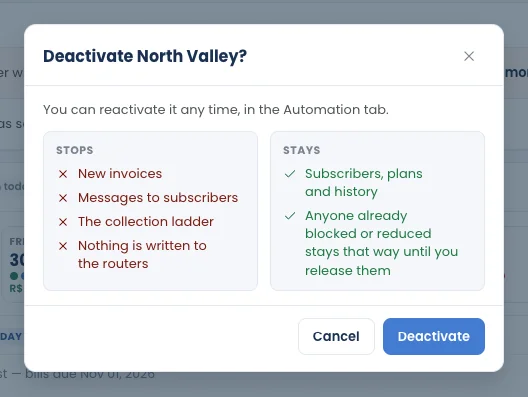
| Stops | Stays |
|---|---|
| New invoices | Subscribers, plans and history |
| Messages to subscribers | Anyone already blocked or with reduced speed stays that way until you release them |
| The collection steps | |
| Anything written to the routers |
The operation goes back to draft and shows Deactivated on with the date.

Reactivate it
Section titled “Reactivate it”Click ⋯ › Reactivate, or Activate this operation on the operation’s Automation tab. Billing and the collection steps start again.
Delete an operation
Section titled “Delete an operation”Click ⋯ › Delete operation. The dialog first shows what the operation holds: Subscribers, Invoices issued, Payments recorded and PPPoE logins on the routers, plus its routers. What happens next depends on that.
If nothing was ever recorded
Section titled “If nothing was ever recorded”No subscriber, no invoice and no payment:
- Type the operation’s name to confirm.
- Click Delete operation.
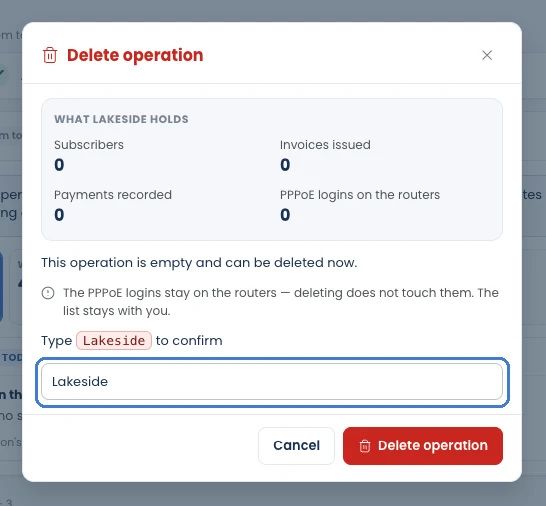
The operation is deleted right away. Its routers are released; the PPPoE logins on the routers are not touched.
If the operation has data
Section titled “If the operation has data”You send a deletion request instead:
- Pick the Reason: Created by mistake, No longer used, Starting over or Other. For Other, a note is required.
- Click Request deletion.
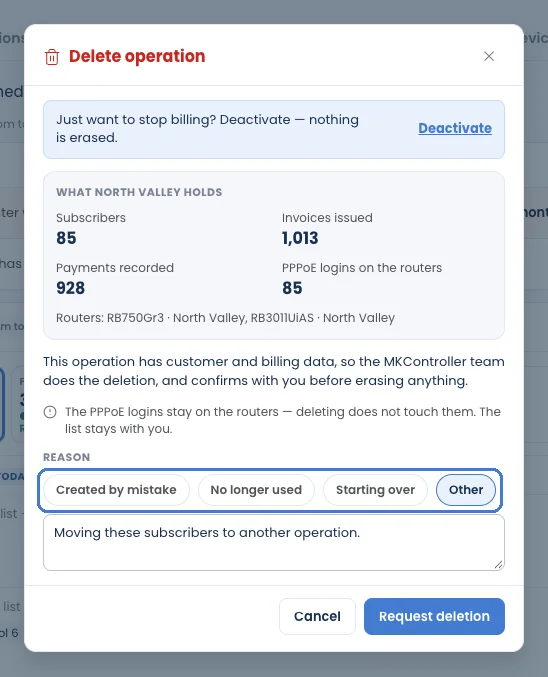
The request goes to our Support team, who do the deletion and confirm with you before erasing anything. The PPPoE logins stay on the routers either way. While it is pending, a notice shows on the operation, and you can cancel the request from it.

A deleted operation disappears from every list.