
Get Paid — Payout & Financeiro
このコンテンツはまだ日本語訳がありません。
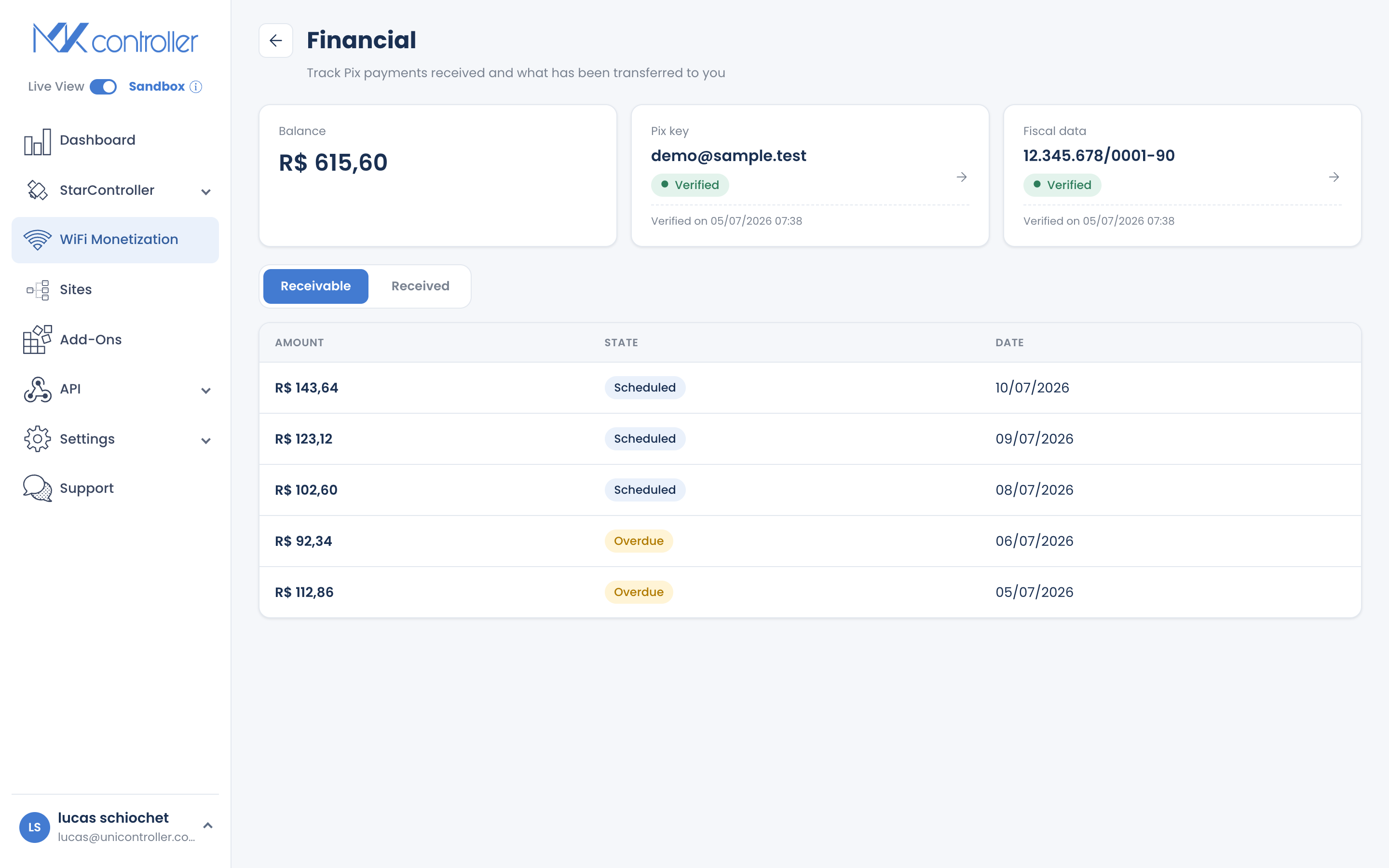
Summary Payout (Financeiro) is where you receive the money guests pay by Pix. Verify your Pix key and fiscal document once, and your net earnings build as a balance you can be paid out. The screen shows receivables (money on the way) and deposits (money paid), with predicted transfer dates. Payouts are processed manually; there is no automated bank transfer or in-product refund.
What Is Payout?
Section titled “What Is Payout?”Payout, labeled Financeiro in the app, is your money screen for a voucher. It tracks what your Pix sales have earned and what has been paid out to you. You reach it from the balance pill in the header of your Dashboard.
Your balance is your net Pix earnings (after the 5% fee) minus what has already been deposited to you.
One-Time Verification (KYC)
Section titled “One-Time Verification (KYC)”Before you can be paid, MKController verifies who you are — a standard step for handling money. You submit two things:
- Pix key — the key where you want deposits sent.
- Fiscal document — the document that identifies you or your business.
Once both are verified, your balance is unlocked for payout. This is a one-time setup; do it early so your earnings are ready to withdraw when they add up.
Reading Your Ledgers
Section titled “Reading Your Ledgers”Payout has two tabs:
- Receivable — sales that are confirmed and on their way to you, shown as a summary plus pending items. Each carries a predicted transfer date (by default a few days after the sale).
- Deposits — the history of money actually paid out, with dates and amounts.
Between them you always know what you have earned, what is coming, and what has already landed.
How Payouts Are Processed
Section titled “How Payouts Are Processed”Payouts are manual: your verified balance is paid out to your Pix key by the MKController team, and each deposit is recorded on the Deposits tab.
Getting Ready to Be Paid
Section titled “Getting Ready to Be Paid”- Enable Pix so there are sales to pay out.
- Verify your Pix key and fiscal document so the balance is unlocked.
- Check the Receivable tab to see earnings and predicted transfer dates as sales come in.
Frequently Asked Questions
Section titled “Frequently Asked Questions”How do I get paid? Verify your Pix key and fiscal document; your net Pix earnings build as a balance and are paid out to that key.
Why do I need to submit a fiscal document? It is a one-time identity verification required to handle payouts.
When will I receive the money? Confirmed sales show a predicted transfer date, by default a few days after the sale. Deposits are recorded as they are made.
Are payouts automatic? No. Payouts are processed manually and recorded on the Deposits tab.
Can I refund a guest from here? No. WiFi Monetization has no in-product refund; handle refunds with your payment provider.
Does this include my card/M-Pesa sales? No. Those settle directly to your own gateway account. This balance is for Pix.
Explore next: Receive Pix Payments · Configure Payment Gateways · Dashboard, Realtime & Reports · WiFi Monetization FAQ
Questions about payouts? Talk to our team on WhatsApp or start your free MKController account.