
Cancel Your MKController Subscription
Want to understand what happens after cancellation? See Plans and Pricing for the full account lifecycle — including the grace period, blocked state, and what happens to your data.
Summary This guide explains how to permanently delete your MKController account from the Settings panel. The deletion requires both your account password and an email verification code. The action is irreversible — once completed, all account data, device configurations, backup history, and associated records are permanently removed.
How Do You Permanently Delete Your MKController Account?
Section titled “How Do You Permanently Delete Your MKController Account?”Account deletion is a permanent action and cannot be undone. All device configurations, backup history, availability data, voucher records, and user settings associated with the account will be removed.
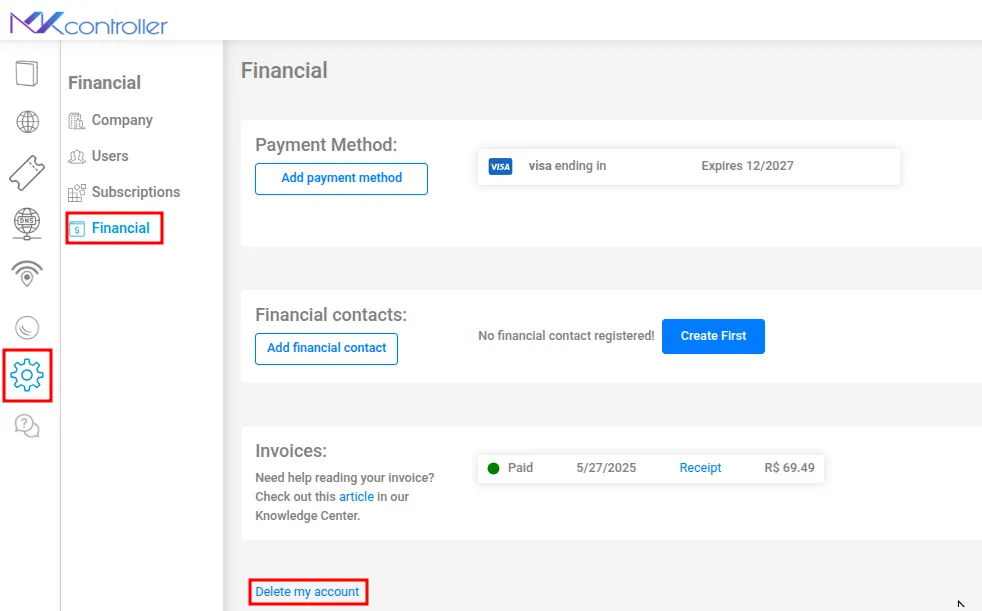
Step 1: Open the Settings Menu
Section titled “Step 1: Open the Settings Menu”Log in to your MKController account. In the sidebar or top navigation, click the gear icon (⚙️) to open Settings.
Step 2: Navigate to Financial
Section titled “Step 2: Navigate to Financial”Inside Settings, select Financial. This section contains all billing, subscription, and account lifecycle controls.
Step 3: Find the “Delete My Account” Option
Section titled “Step 3: Find the “Delete My Account” Option”Scroll to the bottom of the Financial page and click Delete my account.
Read the warning carefully before proceeding. This is a permanent deletion — not a subscription pause or a temporary deactivation.
Step 4: Confirm Your Identity
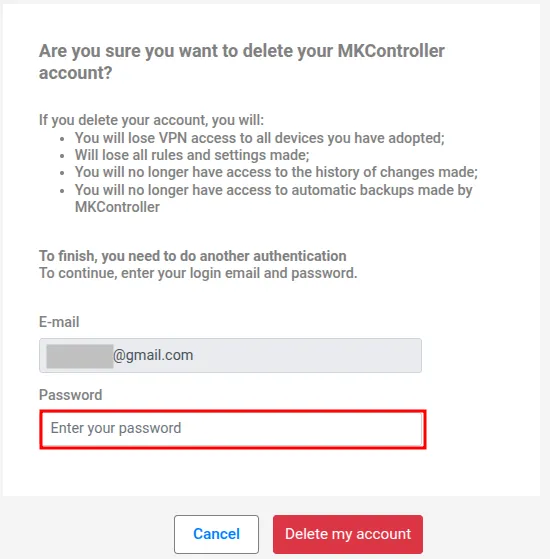
Section titled “Step 4: Confirm Your Identity”A confirmation window appears. You must enter:
- Your MKController account password.
- The verification code sent to the email address registered on your account.
Check your inbox for the verification email. If it does not arrive within a few minutes, check your spam or junk folder.
Step 5: Finalize the Deletion
Section titled “Step 5: Finalize the Deletion”Once both the password and verification code are entered, click Delete my account again to confirm.
The system processes the request and your account is permanently removed. You will no longer be able to log in with this email address.
Changed Your Mind?
Section titled “Changed Your Mind?”If you opened the deletion flow by mistake, close the confirmation window before clicking the final Delete my account button. No changes will be made until the final confirmation is submitted.
If you want to keep your account but stop paying, see How to Cancel a Subscription for the subscription cancellation option — which retains your account and data until the end of the billing period.
What Data Is Deleted When You Close Your MKController Account?
Section titled “What Data Is Deleted When You Close Your MKController Account?”Deleting your account permanently removes:
- All adopted device records (the MikroTik devices themselves are unaffected — they remain functional with their existing RouterOS configuration)
- All backup files stored by MKController for adopted devices
- All availability history and uptime reports
- All voucher batches, session logs, and revenue records
- All user accounts associated with your organization, including Collaborator accounts
- Your API keys and any active integrations
MikroTik devices lose the MKController tunnel after deletion. They remain accessible locally via Winbox and WebFig, but cloud remote access, monitoring, and automatic backups stop immediately.
Alternatives to Full Account Deletion
Section titled “Alternatives to Full Account Deletion”If you want to stop paying but are not ready to lose your data, consider these options instead of deleting:
Subscription cancellation — Cancelling your subscription (without deleting the account) keeps your data intact until the end of the billing period. After that, the account enters a blocked state but is not deleted immediately. See Plans and Pricing for the full account lifecycle.
Downgrading your plan — If cost is the concern, check whether a lower-tier plan covers your device count. Each adopted MikroTik, UniFi and Starlink device counts as one plan device, and devices monitored through NATCloud do not count — see How your devices are counted. Downgrading keeps all your data and history.
Pausing activity — If your devices go offline seasonally (a summer camp, an event venue), adopted devices that are offline do not consume active bandwidth but continue to count against your subscription. Talk to support about options for seasonal fleets.
Frequently Asked Questions
Section titled “Frequently Asked Questions”Can a Collaborator delete the account? No. Only the account Administrator has access to the Delete Account option. Collaborator-level users cannot see the Financial section in Settings.
How long does deletion take to complete? Account deletion is processed immediately after the final confirmation. The system removes all associated data synchronously — there is no grace period or recovery window.
Can I create a new account with the same email address after deletion? Yes. Once the account is deleted, the email address is released and can be used to register a new MKController account.
Will deleting my account affect my MikroTik devices? Your MikroTik routers will continue operating normally with their current RouterOS configuration. The MKController tunnel is removed, so remote cloud access, monitoring alerts, and automatic backups will stop. Local access via Winbox and WebFig is not affected.
Need help or unsure whether the deletion was completed? Contact our support team on WhatsApp — we can confirm the account status and answer questions about data retention policies.