
Voucher Dashboard — Reports & Analytics
⚠️ Legacy — this page describes the previous Voucher feature. For up-to-date information, see the new WiFi Monetization documentation.
Summary The MKController Voucher Dashboard connects voucher usage to revenue data, showing earnings per batch, device, and time window in real time. A new “Revenue in the last 24 hours” column on the voucher selection screen lets operators spot top-performing locations at a glance. Filters by Device or Batch let you drill into specific equipment or reseller channels.
What Is the MKController Voucher Revenue Dashboard?
Section titled “What Is the MKController Voucher Revenue Dashboard?”The MKController Voucher Revenue Dashboard is a real-time analytics view that connects Wi-Fi voucher usage data to revenue figures, giving hotspot operators a commercial view of their MikroTik voucher deployments. It shows how many vouchers were redeemed, how much revenue each group generated, and how many sessions are active right now — filterable by device, batch, or time window.
If you sell prepaid Wi-Fi access through MikroTik vouchers, this dashboard answers the core question: which voucher group, reseller, or location is generating the most revenue right now?
Not yet set up your voucher system? Start with the MikroTik Hotspot Voucher Overview and the Voucher Onboarding Guide before returning here to review performance.
What Is New in the Voucher Dashboard?
Section titled “What Is New in the Voucher Dashboard?”Revenue Column in Voucher Selection
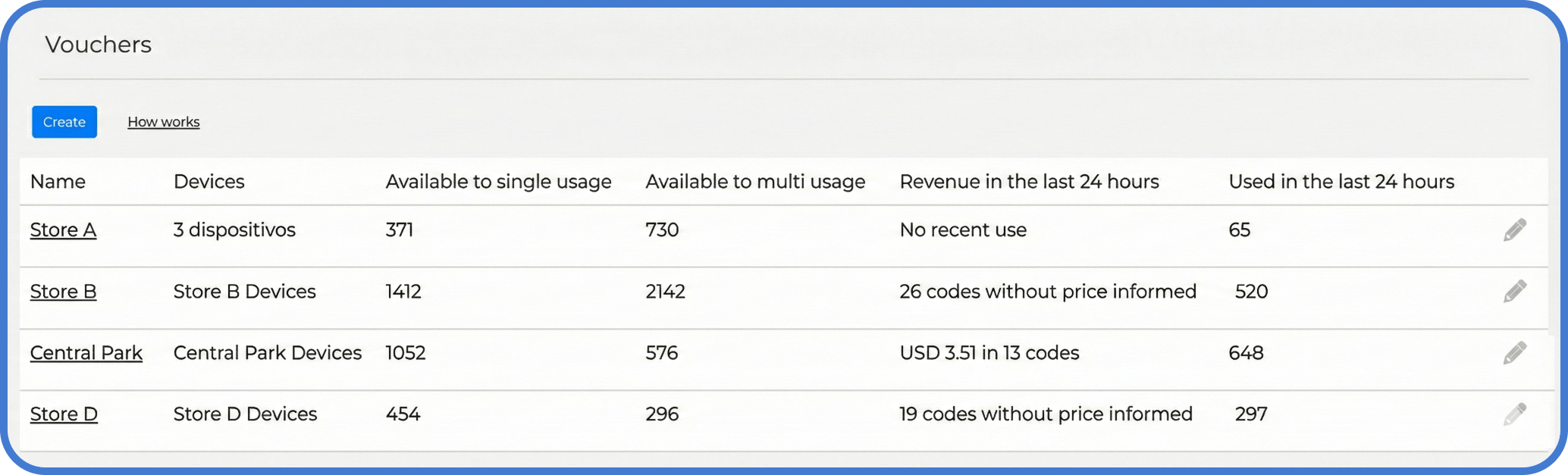
Section titled “Revenue Column in Voucher Selection”The voucher selection screen now shows Revenue in the last 24 hours alongside each voucher group. This single column answers three questions without opening any individual dashboard:
- Which voucher groups are generating revenue today?
- Which groups are active but have no price set (showing zero despite usage)?
- Which location or campaign is performing best right now?
This is particularly useful for operators managing multiple sites, kiosks, or reseller accounts who need a quick pulse check without clicking through each configuration.
More Commercial Detail Inside Each Dashboard
Section titled “More Commercial Detail Inside Each Dashboard”Inside a voucher configuration, the dashboard now surfaces behavior data oriented toward operational decisions rather than purely technical monitoring.
How Do You Filter the Dashboard?
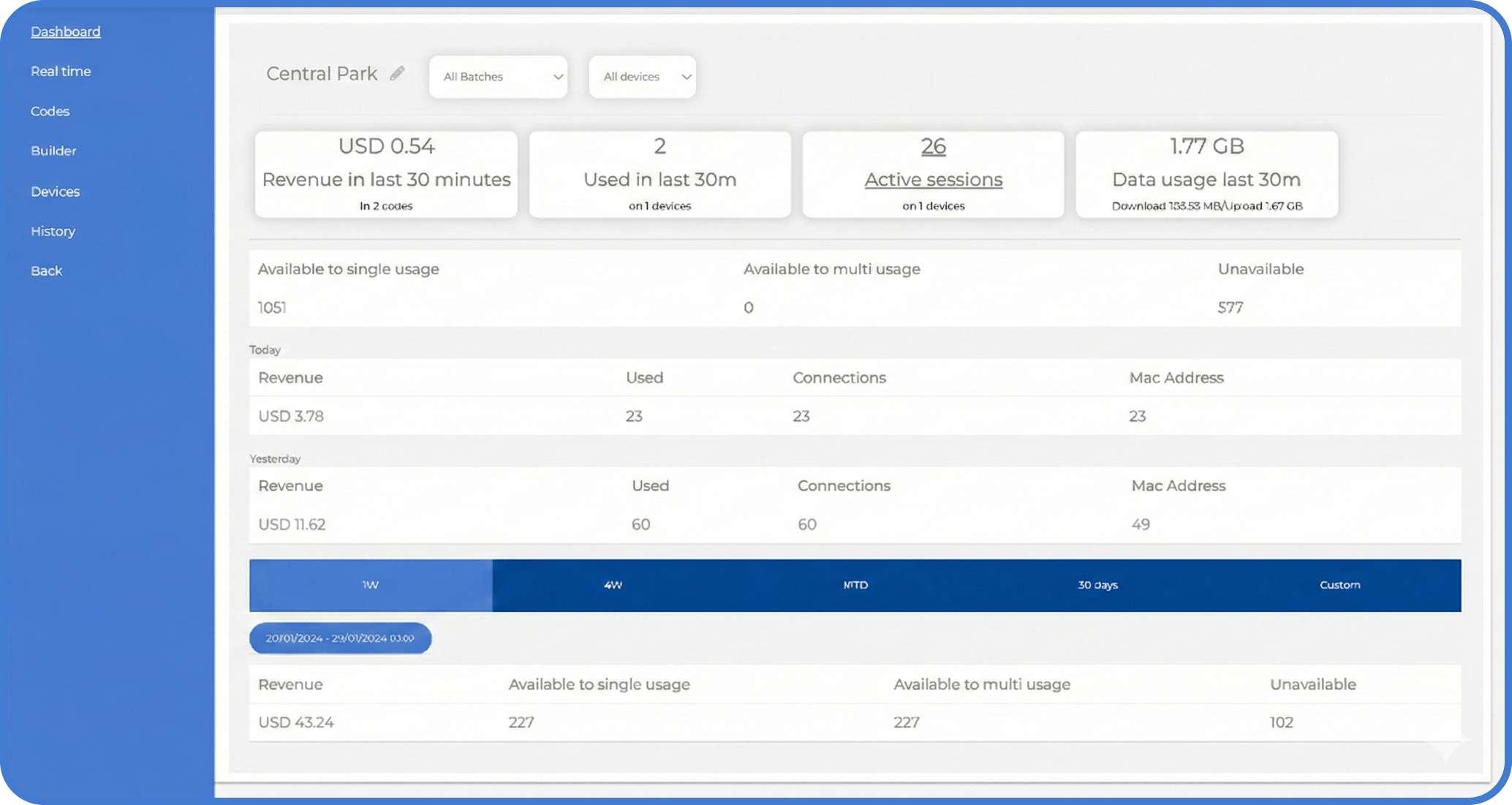
Section titled “How Do You Filter the Dashboard?”At the top of the dashboard, two filter dimensions are available:
Filter by Device
Section titled “Filter by Device”Use this when you want to understand performance by physical equipment or deployment location. Compare “MikroTik Site A” versus “MikroTik Site B” to see which location drives more revenue and whether traffic volume justifies the placement.
Filter by Batch
Section titled “Filter by Batch”Use this when you want to understand performance by reseller or sales channel. A batch named “Reseller B2” shows exactly how many vouchers that distributor sold and what revenue they produced.
What Metrics Does the Dashboard Show?
Section titled “What Metrics Does the Dashboard Show?”| Metric | What it tells you |
|---|---|
| Revenue (last 30 min / today / yesterday) | Earnings in each time window — use for trend spotting and shift comparison |
| Used | Total vouchers redeemed in the selected period |
| Active sessions | Users currently connected through this voucher group |
| Data usage | Download and upload volume for the selected filter and period |
| Unavailable | Vouchers that cannot be used (depleted, expired, or blocked) |
Revenue is defined as total income before costs. For a reference definition, see Investopedia: Revenue. MKController calculates it from the Price field set on each voucher at creation time.
What Time Ranges Are Available?
Section titled “What Time Ranges Are Available?”| Option | Use case |
|---|---|
| 1W — last 7 days | Validate the impact of a recent change: new location, new pricing, new device |
| 4W — last 4 weeks | Medium-term trend analysis |
| MTD — month-to-date | Month-to-date performance from the 1st |
| 30 Days — rolling | Rolling baseline; best starting point to understand normal patterns |
| Custom — exact dates | Investigate a specific promotion, event, or incident |
A simple workflow that works well: start with 30 Days to establish a baseline, then switch to 1W to see whether recent changes moved the numbers, and use Custom for any specific campaign or incident investigation.
What Are the Prerequisites for Revenue Tracking?
Section titled “What Are the Prerequisites for Revenue Tracking?”Revenue calculation requires a Price value on each voucher. If Price is not set, the dashboard will show voucher usage but zero revenue.
- Vouchers created from January 1, 2025 onward include the Price field by default.
- Older batches running without Price: contact MKController support and we can help you add it.
All MKController customers have access to this dashboard on the web platform. Mobile app support is coming soon.
Troubleshooting: Dashboard Shows Zero or “No Recent Use”
Section titled “Troubleshooting: Dashboard Shows Zero or “No Recent Use””If revenue shows zero or the dashboard appears empty, check:
- The voucher group has a non-zero Price set.
- The selected Device or Batch filter matches the actual deployment.
- The time range is not too narrow (try switching to 30 Days).
- Users are redeeming vouchers from the expected group and not a different configuration.
For answers to common questions about voucher configuration — usage modes, data limits, print options, and captive portal setup — see the Voucher FAQ. For data limit configuration specifically, see the Data Limit guide.
Questions about revenue reporting or pricing configuration? Talk to our team on WhatsApp.